Adding multiple titles/movies to 1 DVD using Nero Recode 2

Software you will need:
- Nero Recode 2
| Title: Purchase Nero Recode Link: Download Description: Purchase Nero Recode as part of the Nero 7 package | |
| Title: NeroDigital_RC-2.2.6.17c.exe Link: Download Size: 14.95 MB Description: Download the freeware version of Nero Recode 2.2.6.17c |
Possible uses for this guide:
- Adding 2 or more DVD's to 1 DVD-R or DVD+R
- Joining a double sided DVD (meaning you have to take the disc out and flip it over to watch the rest) to a single sided DVD-R or DVD+R
- Taking 2 different movies & creating 1 DVD out of them
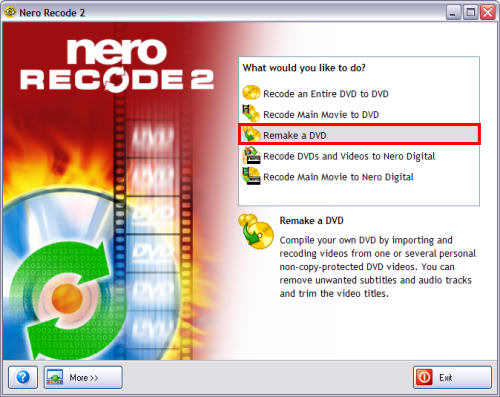
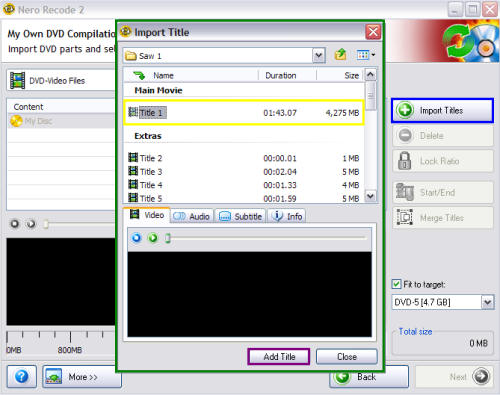
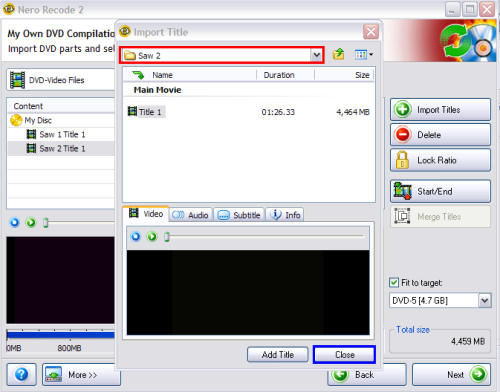
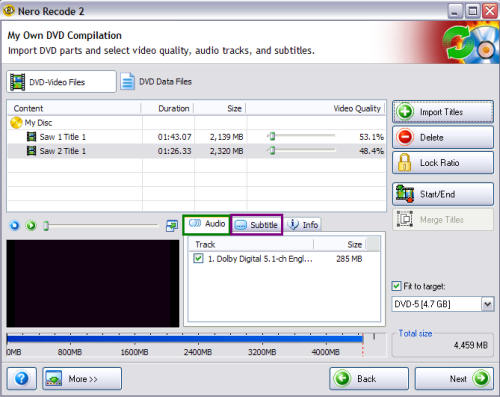
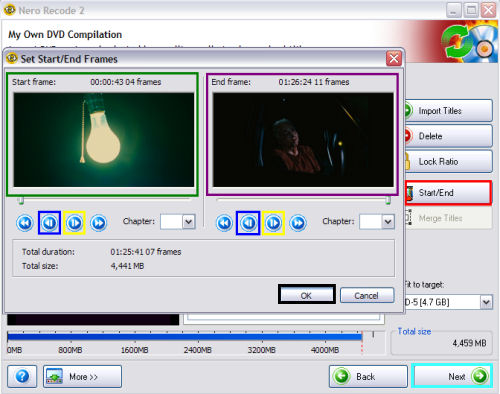
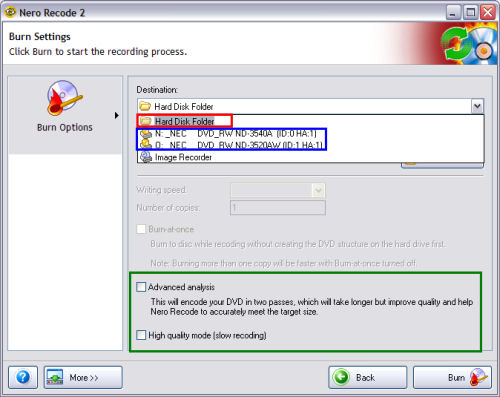
DONE! Enjoy your multi title/movie DVD!
Article taken from http://www.dvdr-digest.com
Download Acer Aspire 4720 Notebooks Driver for Windows XP
Driver
Driver File Size : 19.8 Mb
Driver
Driver File Name : CIR
Driver File Size : 3 Mb
Driver Version : 7.1.64.1010
Driver File Name : WLAN-INTEL
Driver File Size : 6 Mb
Driver Version : 2.0.01
Driver File Name : Launch Manager
Driver File Size : 3 Mb
Driver Version : 2.0.01
Driver File Name : Modem
Driver File Size : 3 Mb
Driver Version : 9.1.19.4
Driver File Name : Touchpad
Driver File Size : 6 Mb
Driver Version : 9.1.19.4
Driver File Name : CardR
Driver File Size : 2.6 Mb
Driver Version : 351
Driver File Name : Bison AP
Driver File Size : 7 Mb
Driver Version : 7.96.701.09c
Driver File Name : Suyin AP
Driver File Size : 8 Mb
Driver Version : 5.7.29.500
Driver File Name : Audio
Driver File Size : 36.8 Mb
Driver Version : 5423
Driver File Name : LAN
Driver File Size : 9 Mb
Driver Version : 10.26.0.0
Driver File Name : WLAN Broadcom
Driver File Size : 3 Mb
Driver Version : 4.100.15.7
Driver File Name : WLAN Atheros
Driver File Size : 3 Mb
Driver Version : 6.14.10.4837
Driver File Name : nVidia
Driver File Size : 67 Mb
Driver Version : 101.45
Driver File Name : VGA INTEL
Driver File Size : 16 Mb
Driver Version : 6.14.10.4837
Driver File Name : Chipset
Driver File Size : 2 Mb
Driver Version : 8.3.0.1014
How To Install Windows XP on Dell Inspiron 1525 or Downgrading Vista to XP
a. You have to prepare SATA Driver on your USB Disk. You may get the Dell Inspiron 1525 SATA HERE
b. You have to prepare Dell Inspiron 1525 Wireless Card Driver as well known as Broadcom BCM 4311.
c. For Dell Inspiron 1525 Webcam you have to get Creative Labs Webcam that you may get it in the Windows Update Sites.
d. Get Marvell Yukon 88E8040 PCI-E Fast Ethernet Controller drivers.
e.
Video Card Driver Intel GM965
Dell Application Software Quickset
Ricoh R5C833 Flash Drive controller Driver
Sound Audio Driver Dell Inspiron 1525 SIGMATEL STAC 92XX C-Major HD
Download Intel Chipset
Dell Inspiron 1525 Modem Conexant D330,HDA,MDC,v.92,
Touchpad
Notes: After installing windows XP, you have to prepare windows Downgrade XP patch for Dell Inspiron 1525 before installing Dell Wireless 355 Bluetooth Module and finish Dell Inspiron 1525 driver for Windows XP Installation. Enjoy Xp on your Dell Inspiron 1525 Notebooks.
CD XP Driver for Compaq Presario C738TU, F762AU
 Dapat CD XP Driver for Compaq Presario C738TU, F762AU dalam bentuk CD. Hanya RM15.00 sekeping. Tak perlu susah-susah nak cari atau download dari internet. Apa tunggu lagi. Pesanlah sekarang. Bayaran pos percuma untuk Sabah. Untuk Sarawak dan semenanjung, bayaran pos sebanyak RM3.00 dikenakan.
Macamana nak order dan pembayaran? Sila klik di sini.
CD XP Driver for Compaq Presario V3628TU / V3658TU
Dapat Driver XP Compaq Presario V3628TU / V3658TU dalam bentuk CD.Hanya RM15.00 sekeping. Tak perlu susah-susah nak cari atau download dari internet. Apa tunggu lagi. Pesanlah sekarang. Bayaran pos percuma untuk Sabah. Untuk Sarawak dan semenanjung, bayaran pos sebanyak RM3.00 dikenakan.
Macamana nak order dan pembayaran? Sila klik di sini.
Acer Aspire 5040 XP driver
Please follow this link
http://www.driverstock.com/Acer-Aspire-5040-driver-download/4-21-12865/index.html
How to Convert FAT to NTFS file system
To convert a FAT partition to NTFS, perform the following steps.
Click Start, click Programs, and then click Command Prompt.
In Windows XP, click Start, click Run, type cmd and then click OK.
At the command prompt, type CONVERT [driveletter]: /FS:NTFS.
Convert.exe will attempt to convert the partition to NTFS.
NOTE: Although the chance of corruption or data loss during the conversion from FAT to NTFS is minimal, it is best to perform a full backup of the data on the drive that it is to be converted prior to executing the convert command. It is also recommended to verify the integrity of the backup before proceeding, as well as to run RDISK and update the emergency repair disk (ERD).
NTFS vs. FAT
To NTFS or not to NTFS—that is the question. But unlike the deeper questions of life, this one isn't really all that hard to answer. For most users running Windows XP, NTFS is the obvious choice. It's more powerful and offers security advantages not found in the other file systems. But let's go over the differences among the files systems so we're all clear about the choice. There are essentially three different file systems available in Windows XP: FAT16, short for File Allocation Table, FAT32, and NTFS, short for NT File System.
FAT16
The FAT16 file system was introduced way back with MS–DOS in 1981, and it's showing its age. It was designed originally to handle files on a floppy drive, and has had minor modifications over the years so it can handle hard disks, and even file names longer than the original limitation of 8.3 characters, but it's still the lowest common denominator. The biggest advantage of FAT16 is that it is compatible across a wide variety of operating systems, including Windows 95/98/Me, OS/2, Linux, and some versions of UNIX. The biggest problem of FAT16 is that it has a fixed maximum number of clusters per partition, so as hard disks get bigger and bigger, the size of each cluster has to get larger. In a 2–GB partition, each cluster is 32 kilobytes, meaning that even the smallest file on the partition will take up 32 KB of space. FAT16 also doesn't support compression, encryption, or advanced security using access control lists.FAT32
The FAT32 file system, originally introduced in Windows 95 Service Pack 2, is really just an extension of the original FAT16 file system that provides for a much larger number of clusters per partition. As such, it greatly improves the overall disk utilization when compared to a FAT16 file system. However, FAT32 shares all of the other limitations of FAT16, and adds an important additional limitation—many operating systems that can recognize FAT16 will not work with FAT32—most notably Windows NT, but also Linux and UNIX as well. Now this isn't a problem if you're running FAT32 on a Windows XP computer and sharing your drive out to other computers on your network—they don't need to know (and generally don't really care) what your underlying file system is.The Advantages of NTFS
The NTFS file system, introduced with first version of Windows NT, is a completely different file system from FAT. It provides for greatly increased security, file–by–file compression, quotas, and even encryption. It is the default file system for new installations of Windows XP, and if you're doing an upgrade from a previous version of Windows, you'll be asked if you want to convert your existing file systems to NTFS. Don't worry. If you've already upgraded to Windows XP and didn't do the conversion then, it's not a problem. You can convert FAT16 or FAT32 volumes to NTFS at any point. Just remember that you can't easily go back to FAT or FAT32 (without reformatting the drive or partition), not that I think you'll want to.The NTFS file system is generally not compatible with other operating systems installed on the same computer, nor is it available when you've booted a computer from a floppy disk. For this reason, many system administrators, myself included, used to recommend that users format at least a small partition at the beginning of their main hard disk as FAT. This partition provided a place to store emergency recovery tools or special drivers needed for reinstallation, and was a mechanism for digging yourself out of the hole you'd just dug into. But with the enhanced recovery abilities built into Windows XP (more on that in a future column), I don't think it's necessary or desirable to create that initial FAT partition.
When to Use FAT or FAT32
If you're running more than one operating system on a single computer (see Dual booting in Guides), you will definitely need to format some of your volumes as FAT. Any programs or data that need to be accessed by more than one operating system on that computer should be stored on a FAT16 or possibly FAT32 volume. But keep in mind that you have no security for data on a FAT16 or FAT32 volume—any one with access to the computer can read, change, or even delete any file that is stored on a FAT16 or FAT32 partition. In many cases, this is even possible over a network. So do not store sensitive files on drives or partitions formatted with FAT file systems.
Speed up your browsing of Windows 2000 & XP machines
HKEY_LOCAL_MACHINE/Software/Microsoft/Windows/Current Version/Explorer/RemoteComputer/NameSpace
Under that branch, select the key :
{D6277990-4C6A-11CF-8D87-00AA0060F5BF}
and delete it.
This is key that instructs Windows to search for Scheduled Tasks. If you like you may want to export the exact branch so that you can restore the key if necessary.
This fix is so effective that it doesn't require a reboot and you can almost immediately determine yourself how much it speeds up your browsing processes.
For a Safer, faster XP Close Unwanted Services
- Alerter
- Clipbook
- Computer Browser
- Fast User Switching
- Human Interface Access Devices
- Indexing Service (Slows the hard drive down)
- Messenger
- Net Logon (unnecessary unless networked on a Domain)
- Netmeeting Remote Desktop Sharing (disabled for extra security)
- Remote Desktop Help Session Manager (disabled for extra security)
- Remote Procedure Call Locator
- Remote Registry (disabled for extra security)
- Routing & Remote Access (disabled for extra security)
- Server SSDP Discovery Service (this is for the utterly pointless "Universal P'n'P", & leaves TCP Port 5000 wide open)
- TCP/IP NetBIOS Helper Telnet (disabled for extra security)
- Universal Plug and Play Device Host
- Upload Manager
- Windows Time Wireless Zero Configuration (for wireless networks)
- Workstation
Make your Folders Private
•Open My Computer
•Double-click the drive where Windows is installed (usually drive (C:), unless you have more than one drive on your computer).
•If the contents of the drive are hidden, under System Tasks, click Show the contents of this drive.
•Double-click the Documents and Settings folder.
•Double-click your user folder.
•Right-click any folder in your user profile, and then click Properties.
•On the Sharing tab, select the Make this folder private so that only I have access to it check box.
Note :
•To open My Computer, click Start, and then click My Computer.
•This option is only available for folders included in your user profile. Folders in your user profile include My Documents and its subfolders, Desktop, Start Menu, Cookies, and Favorites. If you do not make these folders private, they are available to everyone who uses your computer.
•When you make a folder private, all of its subfolders are private as well. For example, when you make My Documents private, you also make My Music and My Pictures private. When you share a folder, you also share all of its subfolders unless you make them private.
•You cannot make your folders private if your drive is not formatted as NTFS For information about converting your drive to NTFS
Presario V3658TU, V3628TU and C738TU use the same driver...
Try use this link...
http://forums11.itrc.hp.com/service/forums/questionanswer.do?admit=109447626+1223971083856+28353475&threadId=1183943
Clone - CS3 effect

Cannot log in to Windows - The solutions
When you log in to Windows, the computer immediately saves your settings, logs off and returns to the login screen again.This is the result of a corrupt or invalid registry entry, which may have been changed by a virus or spyware. Therefore you are strongly advised to scan your computer for viruses and spyware as soon as possible.
Solution
Method 1
Try this method if you can start Windows in safe mode:
- Boot into safe mode.
- Click Start, Run and enter regedit
- Expand HKEY_LOCAL_MACHINE\SOFTWARE\Microsoft \Windows NT\CurrentVersion\Winlogon
- Select the Winlogon folder.
- If the right-hand pane contains an entry named OldUserinit:
- delete the entry named Userinit
- rename OldUserinit to Userinit. - Check that the value of Userinit is "C:\WINDOWS\system32\userinit.exe," (the comma at the end of the string is important.) Note: if your Windows folder is not C:\Windows, modify the path accordingly.
Method 2
If you have a Microsoft Windows installation CD:
- Perform a repair installation.
Method 3
Try taking the hard drive and attaching it to another Windows XP computer as a slave, or by using a USB-to-IDE adapter. Alternatively you can try making a BartPE recovery CD and booting the computer from that. Any method can be used that gives you read/write access to the hard drive.
Often, the registry entry referred to above has been changed from userinit.exe to wsaupdater.exe. Therefore you have a good chance of success if you just copy Windows\System32\userinit.exe to Windows\System32\wsaupdater.exe
Method 4
Gain read/write access to your hard drive from another computer running the same version of Windows.
- Log in as administrator.
- Ensure that Windows Explorer folder options have enabled Show hidden files and folders.
- Click Start, Run and enter regedit
- Select HKEY_LOCAL_MACHINE
- Click File, Load Hive, then navigate to Windows\System32\Config on your hard drive (not the host system!)
- Select system and click Open.
- For Enter a Key name type anything.
- Expand HKEY_LOCAL_MACHINE\SOFTWARE\Microsoft \Windows NT\CurrentVersion\Winlogon
- Select the Winlogon folder.
- If the right-hand pane contains an entry named OldUserinit:
- delete the entry named Userinit
- rename OldUserinit to Userinit. - Check that the value of Userinit is "C:\WINDOWS\system32\userinit.exe," (the comma at the end of the string is important.) Note: if your Windows folder is not C:\Windows, modify the path accordingly. This is the Windows path when the drive is in use in your computer, not the drive letter it has currently.
- When you have made the changes click File, Unload Hive.
Applies to
- Microsoft Windows 2000
- Microsoft Windows XP
Source : http://www.the-pc-guru.com
Aspire 4930, 4925 Windows XP Drivers
Acer has announced that 4930 comes with latest Intel Processor Technology, 14.1-inch CrystalBryte Panel, NVIDIA GeForce graphics, HDMI Interface, Dolby Home Theatre and Wimax Functionally.
This Driver also compatible for Acer Aspire 4925, 4925G, 4930 or 4930G
Agere MODEM
(1.4M)
V2.1.87.0
WLAN Atherors
(13M)
V5.3.0.85
Camera Bison
(10M)
V7.96.701.13
WLAN Broadcom
(4M)
V4.170.25.19
Camera Chicony
(14M)
V5.8.33.402
CIR ENE
(2M)
V2.5.0.0
WLAN Intel
(6.9M)
V12.0.0.73
VGA Intel
(35M)
V6.14.10.4950
Launch Manager Dritek
(2.7M)
V2.0.01
VGA_NVidia
(154M)
V6.14.11.7561 Part1
Part 2
Camera Suyin
(20M)
V5.8.32.500
TouchPad Synaptics
(8.9M)
V7.0.1101.18
CardReader JMicro
(2.8M)
V1.00.11.02
Bluetooth
(98M)
V5.1.0.4500
Audio Reltek
(42M)
V5.10.0.5624
LAN Realtek
(4.5M)
V5.686.0103.2008
FingerPrint Authentec
(80M)
V6.0.00.15
Chipset
(2M)
V8.7.0.1007
Download XP Drivers for Acer Aspire 5315
This Acer Aspire 5315 features Intel celeron Mobile, 1GB of RAM, 80Gb of hard drive, DVDRW, and 15″ widescreen and bundle with
(Bison) Acer Crystal Eye webcam Application V2.0.0.8
here
(Bison) Acer Crystal Eye webcam V7.96.701.07a
here
(Suyin) Acer CrystalEye webcam Driver v5.7.28.500-1.0
here
(Suyin)Acer Crystal Eye webcam Application V1.0.10
here
Acer Preload Security Patch for Windows XP
here
Ambit
here
ATI VGA Driver v8.371.1.1
here
BCM5787 LAN Driver v10.26.0.0
here
Bison Webcam App Ver. 2.0.0.9
here
Broadcom LAN Driver Ver. 10.43.0.0
here
Broadcom Wireless LAN Driver Ver. 4.150.22.0
here
Flash BIOS v1.19
None
here
Intel AHCI Driver v7.5.0.1017
here
Intel Chipset Driver v8.3.0.1013
here
Intel VGA Driver v6.14.10.4847
here
Intel Wireless Driver v11.1.1.11
here
Launch Manager v2.0.05
here
Realtek Audio Driver v6.0.1.5413_R167
here
Synaptics TouchPad Driver v9.1.11.0
here
Printer service... and reset tools for Canon Pixma iP1880
 Semalam ada 2/3 bijik perinter nak kena servis dan baiki. Printer Canon dan HP. Yang HP masalah catridge jer. Pastu cuci waste ink pad dia. Tukar catridge baru, ok dah. Printer Canon IP1000 ni tuan dia kata terjatuh. Bila diperiksa, ada satu pin dekat dia punya soket untuk catridge printer head tu patah. Terpaksalah aku cari idea camana nak buat supaya dia bleh pakai. Modify pakai plastik terbuang dan lekatkan pakai gam superglue. Ok dah. Bolah tahan sampai 10 tahun ( kalau tak guna la ...wakakaka )
Ada satu lagi printer Canon IP1880 nih. Nak kena reset la nih. Cara dia dibawah nih.
Waste Ink Counter Reset Manual for Service mode
1. Turn On iP1880
2. Push and Hold Resume button about 2 minutes

3. Release Resume button
4. Printer back to normal again
Download iP1880 reset Tools Software here.
Reset Ink Tank Full Error for Canon IP1700
Canon PIXMA iP1700 Photo Inkjet Printer
The Canon PIXMA iP1700 Photo Inkjet Printer is an extremely user-friendly, efficient printer designed to meet all your printing needs in one compact, stylish unit. Need a hardcopy of directions to a friend's house? How about printing out photos taken over the weekend? Whatever your needs, the single function iP1700 gives you more choices, extra features and a better value. In addition, this printer features a unique cutting edge design that is very much in line with today's tastes and styles. No other entry level printer performs as quickly and efficiently while looking so good on your desktop.
The Pixma iP1700 held its own. It printed our ten-page text file at 8.6 pages per minute--slower than the like-priced Lexmark Z845, but faster than many more-expensive models. High-resolution glossy photos printed at a snappy 1.3 ppm.
Procedure to Reset Ink Tank Full Error for Canon IP1700
First Step (Hardware Reset)
1. Turn Off the printer, and then take off the cable power.
2. Push and hold the power button (use your fore finger to hold the power button).
3. Connect again the power cable.
4. Use your middle finger to push the resume button 2 times.
5. Release the power button.
6. Finish. you have finised the first step to reset Ink Tank Full Error (Blink Error).
Second Step (Software Reset by GeneralTool) for Permanent
1. Download IP1700 Resetter from here
2. Unzip in folder C:\
3. Make sure all files attribute have not Read Only.
4. Run GeneralTool.exe
5. At USB Port choose your printer port.
6. Click Lock Release
7. Check EEPROM CLEAR
8. Put in blank paper for printing. And then click Test Pattern 1 button
9. It's All Done. Your Printer IP1700 back normal again.
Installing Windows XP on Compaq Presario C738TU
Presario C738TU is a Dual Core based laptop from HP-Compaq. It is a good machine with an Intel Dual core Processor with 1.6GHz, 512 MB DDR2 RAM, 120GB SATA Hard Drive, a SuperMulti DVD burner with Dual Layer, 15.4" Widescreen display, Wi-Fi, LAN, Integrated Webcam and Microphone and the Operating System used is DOS. You need to install an operating system to work on this machine. We have given the list of all drivers required for the same laptop for Windows XP. You can either click on the given links or copy and paste them to a new browser to download the drivers in to your system. It is always good to have Windows XP Service Pack 2 installed in the system. This will help you to avoid many incompatibility errors.
Here are the basic drivers:
Chipset Driver:
http://asia.giga-byte.com/FileList/Driver/motherboard_driver_chipset_int...
Before installing the Audio and modem drivers in your Notebook you have to install the microsoft update(UAA) driver from the given link:
UAA driver:
ftp://ftp.hp.com/pub/softpaq/sp33501-34000/sp33867.exe
After installing the UAA driver restart the Notebook and then download and install the audio and modem drivers from the following links:
Audio Driver:
ftp://ftp.hp.com/pub/softpaq/sp34001-34500/sp34200.exe
or try the alternate drivers given below
ftp://ftp.hp.com/pub/softpaq/sp35501-36000/sp35682.exe
or
ftp://ftp.hp.com/pub/softpaq/sp34001-34500/sp34386.exe
Download and install the driver, you will get the error while installing.
Perform the below steps to fix the issue.
1. Click on Start and select Run. Now type devmgmt.msc and press enter.
2. Right click on "Audio device on High Definition Audio Bus" and click Update driver.
3. Select "Install from a list or specific location".
4. Click Next. Then select "Don't search, I will choose the driver to install".
5. Click Next and then select "Sound, video and game controller" from the list.
6. Click Next and then click Have Disk.
7. Click Browse C:\swsetup\sp34200 folder and select the .inf (wisxxxx) file and click open and Continue with the onscreen instructions.
Here is the link to download the Modem Driver:
ftp://ftp.hp.com/pub/softpaq/sp33501-34000/sp33890.exe
Download and install the driver, you will get the error while installing.
Perform the below steps to fix the issue.
1. Click on Start and select Run. Now type devmgmt.msc and press enter.
2.Right click on "Modem device on High Definition Audio Bus" and click Update driver.
3. Select "Install from a list or specific location".
4. Click Next. Then select "Don't search, I will choose the driver to install".
5. Click Next and then select "Modem" from the list.
6. Click Next and then click Have Disk.
7. Click Browse C:\swsetup\sp33890 folder and select the .inf (wis30b2b) file and click open and Continue with the onscreen instructions.
Video Driver:
ftp://ftp.hp.com/pub/softpaq/sp35501-36000/sp35810.exe
Wireless Driver:
ftp://ftp.work.acer-euro.com/notebook/aspire_4310/driver/Wireless_Athero...
or
http://h30322.www3.hp.com/pub/softpaq/sp35501-36000/sp35991.exe
LAN Driver(Realtek RTL8100CL LAN Driver):
ftp://ftp.hp.com/pub/softpaq/sp30501-31000/sp30580.exe
Synaptic Touchpad Driver:
ftp://ftp.hp.com/pub/softpaq/sp35001-35500/sp35444.exe
5 in 1 card reader Driver:
ftp://ftp.hp.com/pub/softpaq/sp33501-34000/sp33604.exe
HP Quick Launch Buttons Driver:
ftp://ftp.hp.com/pub/softpaq/sp35501-36000/sp35977.exe
Installation Instructions :
1. Download the spXXXXX.EXE file to a directory on your hard drive.
2. Execute the downloaded file and follow the on-screen instructions.
3. Restart the notebook when the installation is complete.
Download these files and save them for back up for future use.
If you have proble while installing the driver, please follow this link :
http://www.mmoogle.org/compaqc751nrwindowsxpdrivershowto
The easy way to download video from Youtube
What we need is :
Real Player Version 11.0 - to download the video
Total Video Converter - to convert *.flv file to *.avi or *.mpg
1. Install Real player. If u don't hav it, u can click here to download it.
2. After you have install the realplayer 11, restart ur pc.
3. Open Youtube and open the video that u want to download. Move ur mouse over the video and it will open the real player download button " Download This Video". Click it to download.
 4. After finish download the movie, u can convert it to *.avi file using Total Video Converter.
5. Click here to download Total Video Converter.
6. I suggest u convert the movie to *.avi first and then convert *.avi to *.mpg
7. How to use Total Video Converter? Watch the video below...
Total Video Converter Registration Code
How to use Total video converter
Instructions To Install & Run Malwarebytes Anti-Malware
- Double-click mbam-setup.exe icon:
 and when the download dialog box appears, please tick the 'Launch Malwarebytes' Anti-Malware when download completes' as displayed:
- Select your language when this option is displayed.
- Follow default installation instructions
- Decide if you would like a 'Start Menu' folder created when this option is displayed
- Choose your options of preference on the 'Select Additional Tasks' screen
- Review your choices at the 'Ready To Install' screen
- At the end, be sure a checkmark is placed next to 'Update Malwarebytes' Anti-Malware' and 'Launch Malwarebytes' Anti-Malware' as displayed here:

- Then click the
 button
 - Please read the information box when it appears and click the
 button
 - Please allow access via your firewall if an alert is presented to you
- If an update is found, it will download and install the latest version.
- Once the program has loaded, select 'Perform full scan' as displayed here:

- Then click button

- When the scan is complete, you will be presented with a message as such, click the button then click the
 button
 - Be sure that each item has its box ticked as displayed here:
 and click
  .
. - When completed, a log will open in Notepad. Please save it to your desktop for easy access. Copy the contents of the file and paste it back into your thread for review. The log is also default saved to the following location: C:\Documents and Settings\Username\Application Data\Malwarebytes\Malwarebytes' Anti-Malware\Logs\log-date.txt
Lagi antivirus palsu - XP AntiSpyware /XP AntiVirus Scam
Last week there was a comment spam on various blogs, the comment contains a link which redirects the user to a fake/scare scan page of the infamous XP AntiSpyware /XP AntiVirus
The WinSoftware, Inc aka LocusSoftware Inc aka Innovative Marketing is behind this scam. They are using many sites to redirect the users to their fake/scare scan pages.
 Screenshot of fake/scare scan pages
Screenshot of XPAntivirus Application

The site XPDownloadings.com works as a repository for the rogue installers while the XP-Antivirus.com site is used for payment processing.
The scammers also avails a user to sign up for an upgrade to “File Shredder 2008” FileShredder2008.com, which is again a crapware they are exploiting Lavasoft’s application name “File Shredder”.

 Stay away from these sites.
Copy from : http://bharath-m-narayan.blogspot.com/2008/03/xp-antispyware-xp-antivirus-scam.html
Adventure In Borneo Blog Project...
Blog tersebut beralamat di http://adventureinborneo.blogspot.com. Kepada sesiapa yang berminat untuk pergi melancong, bolehlah menghubungi En. Yamin dengan melayari webblognya untuk keterangan lanjut.
Mobile Stuff - Islamic Applications Free Software from ebsoft.web.id
| Azan Times 2.5 | 864 Kb | Java (J2ME) | Azan Times for worldwide Prayers for Mobile Phone (Cell Phones, Windows Mobile, Pocket Pc, Symbian OS) is used to listen Azan (Athan, Adhan, Azaan) automatically on every prayer time (Namaz, Salat) five times a day on the mobile phone. Detail |
| Prayer Times 2.00 | 285.49 Kb | Java (J2ME) Palm | The basics version of prayer times for mobile phone and palm. |
| Zakat Calculator 1.0 | 89.41 Kb | Java (J2ME) Palm | Description:Read, understand and calculate your Zakat with this Free Zakat Calculator. Contains a full authentic guide on Zakat based on the Quran (koran) and Sunnah, with full details. |
| Al-Moazen | 173 KB | Java (J2ME) | Reminder With Azan5 Times A Day, Only Adjust it To Your City & Calculation Method ( not the full version). |
| Arba’in | 9 Kb | Java (J2ME) | 40 hadith by Imam Nawawi |
| Hadith40.jar | 24.49 Kb | Java (J2ME) | this software contains the translation of hadiths from the book of the Islamic scholar Yahia bin Sharaful-Deen An-Nawawi and now known as “An-Nawawi’s Forty Hadiths”. in Bahasa Indonesia, also available in English |
| Qibla Compass Basic | 108.11 Kb | Java (J2ME), Palm, Pocket PC | Get accurate Qibla direction with this MobiQibla/Qibla Compass (for Islam/Muslims) for your local city This basic version has 576 cities in 143 countries. for Java-enabled phones, Pocket PCs, Blackberry devices and Symbian devices. Supports MIDP 2.0 java-enabled phones. |
| DuaQuran | 54.28 Kb | Java (J2ME) | Selected du`a (supplications) from Al Quran in arabic text, english translation and indonesian translation (bahasa indonesia). Available for MIDP 2.0 and MIDP 1.0 |
| DuaEn | 21.15 Kb / 22.79 Kb | Java (J2ME) | This application consists of supplications/duas for everyday of a moslem’s life i.e dua when before/after eating, visiting the sick, entering/leaving mosque, etc. Available in two languages English and Indonesian. |
| Quran juz30 | 28.39 Kb / 31.26 Kb | Java (J2ME) | Islamic Java Application The Translation of Quran Juz 30 in Bahasa Indonesia(Indonesian). Source: Departemen Agama RI. Send a feedback for the future development to muh_tamim@yahoo.com |
| Halal Guide | 73.55 Kb | Java (J2ME), Palm | This is a unique Islamic software gives details of whether an ingredient is halal/haram/or both with information about its origins and how and where it`s commonly used. You can now Alhamdulillah take the guess work out of it all! Simply carry this free software on your mobiles and do quick lookups with a unique display by either browsing through or simply performing a search for a specific food/ingredient/enumber. For Java-enabled phones, Smartphones, Pocket PCs, Blackberry devices and Symbian OS, you can download here. |
Latest Free Software from ebsoft.web.id
| Shollu 3.08 | 966 KB | Islamic Prayer reminder for almost all the cities in the world, with many features such as : scheduler maker, additional message, customize azan sound, 40 nice skins, Qibla direction, custom message, Hijri-Gregorian converter, Automatic shutdown, hibernate at specific time, etc. |
| Terjemah Al-Qur’an 1.5 | 271 KB | Small Indonesian translation of the Quran, features : single exe, very fast searching word. |
| Kamus 2.03 | 2.72 MB | The latest version, an English-Indonesian Dictionary and vice versa. Features : More that 41.000 English-Indonesian word, 35.000 Indonesian-English word and more than 64.000 phrase; 20 nice skins, Clipboard monitoring; Automatic translations, Compact mode etc. |
| Restore my files 1.0 RC 2 | 32 KB | Small tools (applications) to restore ms word, excel or power point (97-2003) that infected by virus. Fast detection and restoring your documents. Download the source code here |
| Arabic Pad 1.03 | 44 KB | Easily write or edit Arabic text without install Office or Windows Arabic. JAWI supported |
| Hidden File Tool 1.0 | 26 KB | Small tools for fast searching hidden-system-archive-read only. Plus easy change the file/folder attributes. Useful when your files/folders was hidden by virus, trojan etc |
Update Program
| Update Shollu to 3.08 | 202 KB | Contain file shollu3.exe, dua.mp3 and registry patch. Update from version 3.07. |
| Shollu 3.07.2 exe only | 115 KB | File Shollu3.exe v3.07.2 ( Update v 3.07, caused by bugs di win2000 ). Now this version is not available for download. Use the newer version. |
| Update kamus to 2.03 | 302 KB | Kamus2.exe and help only, update to version 2.03 |
Other Islamic stuff ( from other sources )
| Font MCS Aljalalah | 41 KB | Arabic fonts the name of Allah |
| Font MCS Basmallah | 91 KB | Arabic fonts “Bismillahirrahmaanirrahiim” |
| Font Islamics Art 1 | 44 KB | Islamics Art Font 1 ( kaligrafi, simbol, dll ) |
| Font MCS Mix | 53 KB | Font Arab berisi campuran kaligrafi ( Calligraphy ), simbol dll |
| Kamus Al Mufid 1.0 | 851 KB | Indonesiaa-Arabic dan Arabic-Indonesian Dictionary ( muslim.or.id ). Very good dictionary with many words. |
| Flash Prayer Times 12.5 | 1.90 MB | Source Code, Algorithm and Prayer times applications in Flash |
| Qur’an Arabic Unicode | 1.33 MB | Quran text in Unicode, English translation and transliteration also included |
| Quran in Word 1.3 | 1.07 MB | Plug Ins AlQuran for Ms-Word. This program will add new menu “Al-Quran” on your microsoft word application. You can insert ayah of quran or translation to your word document with easy. Another language translation here http://myquran.org/msword/ |
Others useful program/tutorial
| Windows Registry Guides | 1.1 MB | Registry tips, tricks & tweaks for optimizing, enhancing and securing the Windows (9x/NT/2000/Xp) |
| Hexapad 1.2 | 180 KB | Very Small Hex Editor ( only 82 KB) with many features + source code. Updated version 1.2 ( 20 September 2007 ) |
| htm2chm 3.0.9.3 | 684 KB | htm2chm is a useful program that allows you to convert html pages with graphics as well as whole sites (for example, retrieved by offline browsers) into a single CHM file. |
| Efek Bayangan | 113 KB | Photoshop tutorial (in PDF format) how to create text shadow easily with Masking technique |
Old version (Archive only)
| Shollu 3.06 | 921 KB | Islamic Prayer Reminder version 3.06 |
| Shollu 3.05 | 923 KB | Islamic Prayer Reminder version 3.05 |
| Shollu 2.15 | 784 KB | The last Prayer Reminder version 2 |
Geographic names and location for “Shollu” prayer reminder. Contain names, Latitudes and Altitudes information.
| Indonesia | 1.00 MB | Indonesia ( ~ 150.000 places ) |
| United States | 369 KB | United States ( ~33.000 places ) |
| Malaysia | 438 KB | Malaysia ( ~62.000 places ) |
| Singapore | 18 KB | Singapore ( ~1.600 places ) |
| Japan | 343 KB | Japan( ~51.000 places ) |
| Hongkong | 20 KB | Hongkong ( ~2.900 places ) |
| Egypt | 357 KB | Egypt ( ~42.700 places ) |
| United Arab Emirates | 20 KB | United Arab Emirates ( ~4000 places ) |
Adzan sound
Adzan file that included with Shollu prayer reminder only have 8 kbps bit rate. Below is Adzan sound with good/high quality (32 kbps up to 128 kbps)
| Adzan Fajr | 2.85 MB | This is high quality ( 128 kbps) adzan at fajr |
| Adzan Egypt | 868 KB | Good quality Egypt adzan |
| Adzan Mecca | 1.35 MB | Good quality ( 56 kbps) adzan from Mecca |
| Adzan Al-Aqsa 1 | 1.39 MB | Adzan from Al-Aqsa (64 kbps) |
| Adzan Al-Aqsa 2 | 1.71 MB | Another Adzan from Al-Aqsa (64kbps) |
| Adzan Turkey | 1.58 MB | Hear adzan from Turkey (56 kbps) |
| Adzan Madinah | 667 KB | Adzan from Madinah (32 kbps) |
| Adzan 1 | 755 KB | Another Adzan file 1 ( 32 kbps) |
| Adzan 2 | 887 KB | Another Adzan file 2 ( 32 kbps) |
| Adzan 3 | 708 KB | Another Adzan file 3 ( 32 kbps) |
| Adzan 4 | 715 KB | Another Adzan file 4 ( 32 kbps) |
Free ebooks
| Al-Qur’anul Kariim v1.1 | 3.30 MB | html help (chm) version of Al-Qur’an and the Indonesian translation |
| Al-Arbain an-Nawawiyah | 182 KB | html help (chm) version of popular hadith Al-Arba’in an-Nawawiyah with syarah by Ibnu Daqiqil ‘Ied |
| Hisnul Muslim 1.03 | 2.20 MB | The popular book of authentic supplications, “Hisnul-Muslim” (Fortification of the Muslim through Remembrance and Supplication from the Qur.aan and Sunnah]) compiled by the Shaykh, Sa’eed Ibn Wahf Al-Qahtaanee, and adapted into the English Language by Abu Safwan Farid Abdulwahid Haibatan |
| Fatwabase 4.99 | 1.26 MB | The latest version containing all the fataawa published on Fatwa-Online in one handy searchable ebook |
| Hisnul Muslim (pdf) | 508 KB | PDF version of Hisnul Muslim with Indonesian translation |
| Hisnul Muslim (doc) | 491 KB | Word version (*.doc) of Hisnul Muslim with Indonesian translation |
| Al-Arbain an-Nawawiyah | 307 KB | Another PDF version of Al-Arbain An-Nawawiyah with Indonesian translation |
Hati-hati dengan antivirus palsu
Kebanyakkan antivirus ini adalah tergolong dalam golongan Malware ( Malicious Software ) iaitu program komputer yang diciptakan dengan maksud dan tujuan utama mencari kelemahan software. Umumnya Malware diciptakan untuk membobol atau merusak suatu software atau operating sistem. Contoh dari malware adalah Virus, Worm, Wabbit, Keylogger, Browser Hijacker, Trojan Horse, Spyware, Backdoor, Dialer, Exploit dan rootkit .
Biasanya antivirus palsu ini akan mengimbas komputer anda dan mengatakan komputer anda telah diserang dengan palbagai virus. Untuk mencuci virus tersebut, anda mestilah membeli software tersebut dengan membuat pembayaran melalui internet.
Dibawah ini disenaraikan beberapa antivirus palsu @ malware.
Windows Antivirus
Aplikasi yang sejenis dengan ini adalah Windows Antivirus 2008, info.
Alamat website Windows-av. com
Micro Antivirus 2009
Aplikasi yang sejenis dengan ini adalah MS Antivirus, info
Alamat website Microantivirus2009. com
Antivirus Security
Aplikasi yang sejenis dengan ini adalah XP Antivirus, info
alamat website Antivirussecurity-solution. com
XP Protector 2009
yang juga merupakan clone dari Antivirus XP 2008
Total Secure 2009
Alamat website Totalsecure2009. com
AntiSpyware Pro XP
Aplikasi ini merupakan clone dari Antispyware 2008 XP
Antivirus Lab 2009
Aplikasi yang sejenis dengan ini adalah Antispycheck. Beralamat di Viruslabs2009. com

Malwarebytes' Anti-Malware Download Link