Acer Aspire 4530 webcan problem...
Biasanya jika webcam "blank" saya akan uninstall driver dan softwarenya kemudian restart dan install balik software serta driver semula. Cara ini bolah dikatakan menjadi tapi selepas beberapa ketika ianya "blank" semula...
Maybe someone can fix these problem...
Reset Counter Canon i250, i255, i350, i355
To reset waste ink counter pad in Canon i250, i255, i350, i355 there are two Steps, that is reset manual and reset use software resetter (general tool). Whereas reset manual any two methode can be used. Here Complete tutorial to reset waste ink counter for Canon i250, i255, i350, i355 printers.
Manual Reset for Canon i250, i255, i350, i355
Methode 1 : Manual for service mode
- Unplug power cable from electric source and USB cable from computer.
- Open the printer cover and hold power button.
- Connect power cable to the electric source.
- Close the printer cover then release power button.
Methode 2: Manual for service mode
- Turn off the printer. And disconnect the printer cable.
- Press and hold the POWER button, turn on the printer.
- The indicator LED should be green.
- Press and release the RESUME button , the indicator LED should be orange.
- Press and release the RESUME button again, the indicator LED should be green.
- Release both buttons.
Resettting using software resetter canon i250, i255, i350, i355
- Reconnect the printer cable.
- Download and Run General Tools/software resetter for Canon printers i250, i255, i350, i355.
- Then select USB PORT where your printer installed.
- Choose printer type in SET DESTINATION sections and printer should be reset.
Note : After service mode use software for permanent reset Canon i250, i255, i350, i355
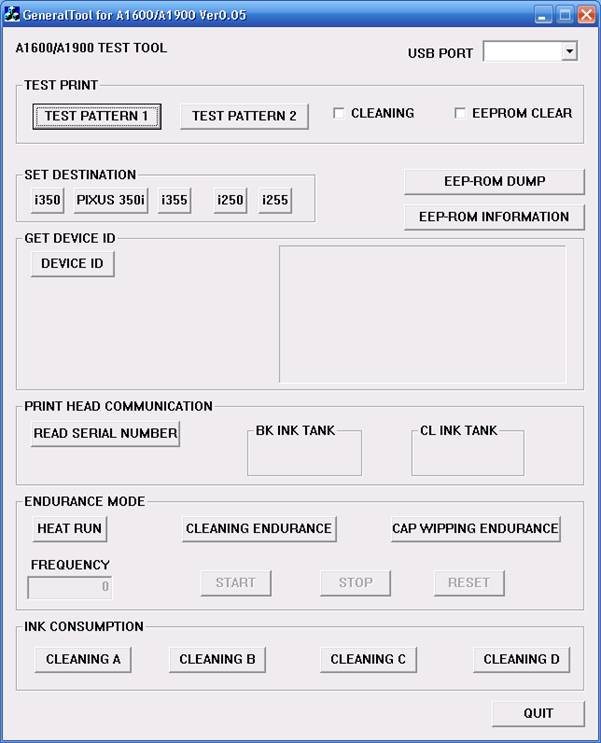
 software Canon i250, i255, i350, i355 (118.9 KiB)
To reset waste ink counter pad in Canon i250, i255, i350, i355 there are two Steps, that is reset manual and reset use software resetter (general tool). Whereas reset manual any two methode can be used. Here Complete tutorial to reset waste ink counter for Canon i250, i255, i350, i355 printers.
Manual Reset for Canon i250, i255, i350, i355
Methode 1 : Manual for service mode
- Unplug power cable from electric source and USB cable from computer.
- Open the printer cover and hold power button.
- Connect power cable to the electric source.
- Close the printer cover then release power button.
Methode 2: Manual for service mode
- Turn off the printer. And disconnect the printer cable.
- Press and hold the POWER button, turn on the printer.
- The indicator LED should be green.
- Press and release the RESUME button , the indicator LED should be orange.
- Press and release the RESUME button again, the indicator LED should be green.
- Release both buttons.
Resettting using software resetter canon i250, i255, i350, i355
- Reconnect the printer cable.
- Download and Run General Tools/software resetter for Canon printers i250, i255, i350, i355.
- Then select USB PORT where your printer installed.
- Choose printer type in SET DESTINATION sections and printer should be reset.
Note : After service mode use software for permanent reset Canon i250, i255, i350, i355
software Canon i250, i255, i350, i355 (118.9 KiB)
Alat untuk mencuri data / kata kunci...
 For your information.. be careful
Alat ini dicucuk di hujung cable keyboard yg terhubung ke PC, ini digunakan untuk menyimpan semua data yg telah diketik oleh keyboard itu…

Jadi, sebaiknya anda periksa dahulu PC jika Ada sesuatu yg mencurigakan di belakangnya sebelum menggunakan Internet di tempat umum untuk mengakses site penting
Semoga informasi ini berguna untuk anda semua.. Dan mencegah terjadinya hal2 yg tdk diinginkan
LightScribe CD/DVD Media...
Source :
http://www.supermediastore.com/lightscribe-light-scribe-dvd-r-cd-r-media.html
Core 2 Duo vs. Dual Core
Dual core is simply a generic term referring to any processor package with two physical CPUs in one. The Pentium D, Core Duo, Core 2 Duo and Athlon X2 are all current CPUs that have dual cores in one package.
The Pentium D is simply two Pentium 4 Prescott cpus inefficiently paired together and ran as dual core.
The Core Duo is Intel's first generation dual core processor based upon the Pentium M (a Pentium III-4 hybrid) made mostly for laptops (though a few motherboard manufacturers have released desktop boards supporting the Core Duo CPU), and is much more efficiently than Pentium D.
The Core 2 Duo is Intel's second generation (hence, Core 2) processor made for desktops and laptops designed from the ground up to be fast while not consuming nearly as much power as previous CPUs.
Note - Intel has dropped the Pentium name in favor of the Core architecture as Intel is restructuring and refocusing it's efforts to become number one again (and are doing a fine job, might I add).
The AMD Athlon X2 CPUs have two revisions, the first one is essentially very similiar to the Pentium Ds in that they are simply two Athlon 64 chips fused together, making power requirements quite steep (around 89 watts). The second revision is made more efficiently, like the Core Duos, with much less power consumption (around 65 watts).
There are, of course, other differences, but that is the gist of dual cores as it relates to Intel and AMD.