Another link for XP Driver Compaq Presario V3839TU
Try drivers for the Compaq Presario V3839TU Notebook below:
Chipset drivers:
ftp://ftp.hp.com/pub/softpaq/sp32501-33000/sp32555.exe
Wireless driver:
ftp://ftp.hp.com/pub/softpaq/sp34001-34500/sp34489.exe
Kalo xbleh: http://www.4shared.com/file/59953939/2cf8687c/WLAN.html
Webcam driver:
ftp://ftp.hp.com/pub/softpaq/sp37501-38000/sp37849.exe
Card reader driver:
ftp://ftp.hp.com/pub/softpaq/sp33001-33500/sp33020.exe
Bluetooth:
ftp://ftp.hp.com/pub/softpaq/sp32501-33000/sp32883.exe
*UAA driver link:
ftp://ftp.hp.com/pub/softpaq/sp33501-34000/sp33566.exe
*In order to install the Audio driver properly, you need to first download and install the UAA driver.
After installing the above driver, restart the Notebook and install the Audio driver after downloading and saving it.
Audio driver:
ftp://ftp.hp.com/pub/softpaq/sp35501-36000/sp35682.exe
Kalo xbleh: http://www.4shared.com/file/59953938/5bff58ea/Audio.html
XP drivers for Compaq Presario V3839TU
Intel Chipset,(install and reboot before other drivers):
http://tinyurl.com/2vdz3e
Intel X3100 Graphics:
http://tinyurl.com/5jgktf
Marvell Yukon Ethernet:
ftp://ftp.hp.com/pub/softpaq/sp37501-38000/sp37792.exe
Alps TouchPad:
http://tinyurl.com/2v4drk
Ricoh 5-in-1 Card Reader:
ftp://ftp.hp.com/pub/softpaq/sp37501-38000/sp37614.exe
.Net Framework(before Q.L.):
http://tinyurl.com/758p8
HP Quick Launch:
http://tinyurl.com/5om4px
==============
Microsoft UAA (with a reboot before Conexant):
http://tinyurl.com/yk2ete
Conextant Audio Drivers:
http://www.mediafire.com/?dg0cmmkm4y4
Unzip to a folder of your choice - remember where.
Device Manager>>>"Audio Device on HD Bus", right click on it and select "update driver"
When it asks to go on line to find a driver - NO
Select "Install from a list or specific location"
and
"Don't search I will choose the driver to install"
In the list of common hardware types,choose "show all".
Remove the check from "Show Compatible Hardware" and click on "Have Disk".
Next...browse to the Driver Folder you unzipped and click on "WiSVHe5.inf" file. Ignore XPs complaint and select "Install Anyway"
Reboot.
=============
Windows Installer 3.1(required before Wireless):
http://tinyurl.com/9cg2y
Intel PRO/Wireless:
ftp://ftp.hp.com/pub/softpaq/sp37501-38000/sp37755.exe
Conexant Modem:
ftp://ftp.hp.com/pub/softpaq/sp37501-38000/sp37817.exe
You may have Broadcom Wireless rather than Intel posted above:
ftp://ftp.hp.com/pub/softpaq/sp36501-37000/sp36684.exe
Best Peer to Peer (P2P) File Sharing Programs and Applications
Traditional Downloading of programs and application from a website has become outdated as well as there are not many website providing free software for download. Another medium for downloading and sharing of files is peer to peer file sharing Networks & Programs and it has grown to tremendous level with many networks having more then millions of users to share software’s, Music files, Videos and Programs etc.
With increase in popularity of Peer to Peer (P2P) network it has become one of medium for spreading of Viruses, Spyware, Ad ware, Malware thru this file sharing applications. Users are seeking for clean, Safe, Fastest and Best p2p file sharing applications.
After searching for hours on google I have got big list of safe and best peer to peer (P2P) program and application.
Top 20 Best p2p (Peer to Peer) File Sharing Applications and Programs
1) Bittorrent :
 This is one of best, fastest, safe and widely used p2p program. Performance of BitTorrent is way better then any other available P2P programs.
2) Limeware:
 LimeWire is clean, safe, virus and malware free p2p software.it has build in media player with optimized search result.supportes download from multiple hosts.
Supported Operating System: Windows, Linux, Mac
Download Limeware Client
3) Shareaza:
 This was one of early p2p program when p2p was still new concept. It supports wide variety of networks like Gnutella, Gnutella2, EDonkey Network, BitTorrent, FTP and HTTP network protocols and which can handle magnet links, ed2k links, Piolet links, and the now deprecated Gnutella links.
Shareza has billions of users and uncountable numbers of files shared across shareaza network
Supported Operating System: Windows XP, Vista
Download Shareaza Client
4) Kazaa:
 Like Shareaza, Kaaza was one of best and most popular p2p during early days of p2p evolution. but in past few year due to many issues like virus infected files, lawsuite, spywares, Kazaa has lost its popularity.
However kazaa has been continually trying to make Kazaa network virus and spyware free with many new features like built in virus scanner, infected file blocking made available in latest Kazaa Client to protect users.
Kazaa Lite is one of best client of Kazaa P2P network for file sharing.
5) iMesh:
 iMesh another popular and spyware, adware free p2p file sharing with application multi language support. iMesh claims to have over 15 million FREE songs & videos Over 2 million original high quality songs licensed from the record labels.
Personally I liked iMesh for downloading music and videos but haven’t found it good for downloading any freeware software or application.
Supported Operating System: Windows XP, Vista
Download iMesh Client for Windows
6) Bearshare Lite:
 Bearshare is pretty good p2p file sharing program with having pretty good user base and millions of files shared on Bearshare also supports for Multilanguage.
Bearshare is good for downloading music and mp3 files
Download BearShare Client for Windows
7) eMule:
 eMule is one of the biggest and most reliable peer-to-peer file sharing clients
around the world thanks to its open source support and based on edonkey2000 client.
eMule has Multilanguage support with ability to connect to multiple servers and intelligent file corruption detection system to help you in getting genuine files. eMule is free from spyware, adware and its completely free.
eMule is also available in portable form to run from your USB derive
Supported Operating System: Windows XP, Vista
Download eMule Client
8 ) KCeasy:
 KCeasy is client based on giFT peer to peer file sharing protocol. This protocol improves the overall usability of peer to peer network, ability to downloads single file from multiple peers simultaneously.KCeasy supports multiple networks for file sharing.
 Supported Operating System: Windows XP, Vista
Download KCeasy
9) Ares Galaxy:
 Ares is one of my favorite p2p program and I have been using it from last 4 years, ares network is not that much big as compared to other p2p but its completely free from viruses, spywares and adwares.
I haven’t got any infected files or corrupted installer. Ares List is used more then normal Ares client because of its low size, speed and performance.
Supported Operating system: Windows XP, Vista
Download Ares for Windows
10) Soulseek:
 Soluseek central server type of P2P file sharing application. Soluseek is good old p2p file sharing program best of sharing music files. i haven’t tried soluseek ever but have heard that soluseek is best of music, audio, Mp3 files download.
 Supported Operating system: Windows XP, Vista
Download Souleseek Client
11) WinMX
 WinMX one of pretty old peer to peer file sharing program has suffered due to lowsuite and its official website and server is now offline form 2005 although WinMX program is still operating successfully.
WinMX network has limited number of Viruses and also it has restriction of maximum file size can be shared is 2 GB only.WinMX is mojouly used for audio and video file sharing but you can use it for sharing any types of files.
Supported Operating system: Windows XP
Download WinMX
12) Piolet:
 Piolet is the 3rd generation peer-to-peer file sharing client. This is considerably new p2p file sharing application/Website and it has started gaining popularity among P2P users.
Free version of piolet shows ads and has no search functionality. i really doubt whether this can become good P2P file sharing program.
Supported Operating System: Windows XP
Download Free Piolet client
13) Gnutella:
 Gnutella is file sharing network which is supported by several p2p clients like LimeWire, BearShare, Shareaza etc.
Gnutella has strong user base with less number of infected files present in file sharing network.
Supported Operating System: Windows, Linux, Mac
14) Overnet:
 Overnet is distributed file sharing program which is based on its own network Overnet has more then millions of users with some interesting features like File corruption detection, decentralized, fast search and downloading of files.
Supported Operating System: Windows Linux, Mac
Download Overnet client
15) Azureus now called as Vuze
 Azureus is best torrent client with built in search functionality as well as peer to peer torrent sharing. Veze has best bandwidth management for faster file transfer and downloading
Supported Operating System: Windows Linux, Mac
Download Vuze client
16) FrostWire:
 Frostwire is like Vuze is another most popular bittorrent client as well as p2p file sharing client which supports Gnutella, Gnutella2, EDonkey Network. it’s completely free from virus and spyware with iTunes integration.
Supported Operating System: Windows, Linux, Mac
17) uTorrent :
 uTorrent is lightweight efficient bittorrent client with lot many features like RSS downloader, Multiple simultaneous downloads downloading, Bandwidth configuration and IPv6 support.
 Supported Operating System: Windows XP, Vista, 98, NT
Download uTorrent Client
18) Morpheus:
 Morpheus is free p2p file sharing program with many features like search, easy user interface, No spyware, Popups or ads. Latest version of Morpheus also supports P2P Streaming media for video and audio.
 Supported Operating System: Window Xp/Vista
Download Morpheus Client
19) ANts:
ANts is written Java hence it’s supports all types of operating system.Ants is still in beta and not many users are using it
Download ANts peer 2 peer file sharing client
20) Acquisition:
 Acquisition is relatively new and paid type of p2p file sharing programe. Acquisition uses Gnutella network for peer-to-peer file sharing and BitTorrent client .It is based on LimeWire.
This is one of dedicated P2P software which runes only on Mac OS X.
If know any other free peer to peer (P2P) file sharing Application/Program then please post in below comment.
How To View Myspace Private Profiles...?
Myspace Private Profiles can be easily view with MySpace Private Profile Viewer.
Social Networking Websites are most popular and mostly used by youngsters around the world. Popularity of social Networking websites like Facebook, Myspace, Orkut is not unknown to us.
Most important part in any social networking websites is maintaining privacy of users. Since profiles of any user on this social networking website is publicly accessible hence can be misused by any one. Myspace lets you to set your profile as private or open for all.
Once you set your profile as private, no one can view the users pictures, comments, information or anything about that user. In order to view private profile of any user on Myspace you have to be a friend of that user.
Here is one application Myspace Private Profile Viewer which lets you to view Myspace Private Profiles easily without need to be added as friend. With Myspace Private Profile Viewer you can secretly view any private profile by just providing user profile name.
Screenshots of Myspace Private Profile Viewer
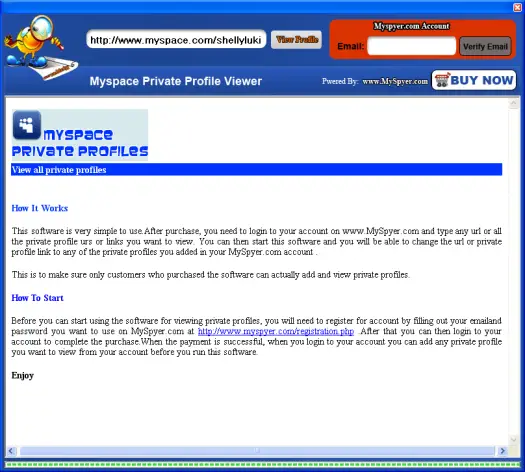
Myspace private profile viewer is paid software and casts around $30. but you can try demo version before purchasing.
Search & Download Movie Subtitles with Freeware Sublight
We all love to watch Movies in our regional languages, the language which we can understand easily then only you can enjoy that movie. But chances are high that movie of your choice may not be available in your regional languages then only option is left to have subtitle of that movie in your language.
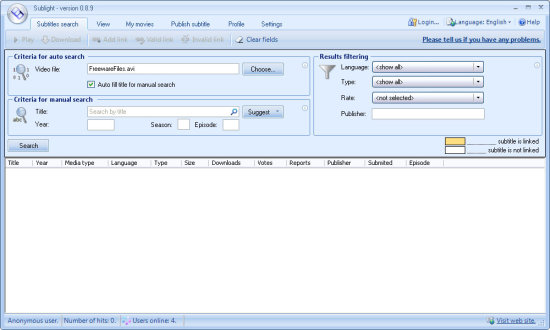
Searching Subtitles of movies & Videos might be difficult as well as time consuming for non-technical users. Here is nice application Sublight 0.9.4 which will simplify this subtitle search task Sublight is freeware desktop application which allows you to Search & download subtitles for your movies.
Sublight currently supports 27 languages for which you can search and download subtitles for Movie and Video. You can Search Subtitles with various criteria like Movie Title, Year of Release, and Season.
Features of Freeware Sublight 0.9.4
1) Auto & manual subtitle search along with subtitle ratings and commenting
2) Preview subtitle before download,
3) Windows Explorer integration (optional),
4) Video playback for downloaded subtitles (with just one double click),
5) Auto update capability,
6) Plugin framework for searching subtitles from other sources (plugin for Podnapisi.NET database is included),
7) Support for OpenSubtitles.org and Podnapisi.NET database,
Screenshot of Freeware Sublight 0.9.4
Activate Windows 7 Pre Beta 6801 without Crack or Product Key
15 Windows 7 Activation Keys Which you can use to activating your Windows 7
J7PYM-6X6FJ-QRKYT-TW4KF-BY7H9
D67PP-QBKVV-6FWDJ-4K2XB-D4684
HQDKC-F3P6D-C9YYM-HRB89-QDBB7
76DX2-7YMCQ-K2WCP-672K2-BK44W
2RG93-6XVFJ-RKHQ7-D2RTT-3FMQT
TT63R-8JGWP-WWT97-R6WQC-4CVWY
YQJX6-D6TRM-VWBM7-PHDJK-YPXJH
Q7J7F-GQHBT-Q42RQ-2F8XV-2WKKM
KH4X7-JY8G7-RCD7G-BYDJW-YTPXH
WYBJ8-8QVP3-24R82-VV2VP-72Q9W
9DP2R-W78GJ-GJBKW-CKR46-H3WYT
CXB7F-WWCM4-BP9V3-2YH43-RK8Y6
W9BYV-K2TB8-4YDJT-QBQWP-KFDHB
WGDJW-B8DYC-WVKX4-6MKF4-B8PK8
2PHXF-9PBDW-D3WWY-CPDKD-XG87V
Windows 7 announced at recent Microsoft PDC 2008 event, with the announcement and screenshots of windows 7 users are becoming impatient to try and test windows 7. Thought windows 7 is not available for downloaded for normal users but leaked version of windows 7 Pre beta torrents are spreading very fast.
You may download windows 7 Pre Beta 6801 but you will need to activate windows 7 to actually enjoy unrestricted features of windows 7. As said earlier for normal users it’s impossible to get activation key or Product Keys for windows 7 and there are no cracks for windows 7 activation is available yet.
You can complete installation of windows 7 by leaving product key filed blank and enjoy Windows 7 Pre Beta 6801 for 30 days maximum before it gets expiry. The only way to activate windows 7 Pre Beta is by using product key for Windows Vista beta or RC edition.
Microsoft gave out free beta product key of windows vista RC 1 and RC 2 to the user who has participated Windows Vista Customer Preview Program. The product Key was arrived in the email from service@microsoft.com that titled with subject of “Microsoft Windows Vista Beta 2 Order Confirmation and Product Key”, “Microsoft Windows Vista RC1 Product Key” that looked similar to this:
**********************************
Please keep this e-mail for your records.
**********************************Thank you for your interest in Microsoft Windows Vista RC1. Your Product Key is included at the bottom of this message. You may install RC1 on up to 10 PCs using the same Product Key.
To help answer questions you may have related to installation and use, we have created newsgroups for Windows Vista RC1. To join or read postings in these newsgroups please visit http://windowshelp.microsoft.com.
For the latest information on Windows Vista, please visit http://go.microsoft.com/fwlink/?LinkID=65938.
Thank You,
MicrosoftProduct Key:
XXXXX-XXXXX-XXXXX-XXXXX-XXXXX
To activate Windows 7 online, just enter the product key in Control Panel -> System and Security - System Properties by clicking on Activate Windows now or Change product key link.
Please keep in mind that even after successful activation of windows 7 Pre Beta it will still expiry on August 1, 2009.
Ninja Pendisk 1.4 - Antivirus, Spayware, removal...

To keep things simple, ninja is fully portable, self-contained and requires no installation.

(compatible) XP drivers for Compaq Presario F762AU
here are the compilation of links recovered:
1) lowyat.net forum * contains alternative set of drivers as posted by others
http://forum.lowyat.net/topic/596572
2) mj 梦境
http://hi.baidu.com/jtwak/blog/item/...
3) hp customer care
http://h10025.www1.hp.com/ewfrf/wc/...
4) hpipoh.com forum * site now appears to be down
http://hpipoh.com/modules/wfdownloads/viewcat.php?cid=25
wasn't able to find the link to where i got the sound drivers, but there are a bunch of similiar one on the net though, take this for example:
5) arjunjain @ livejournal.com *refer updates portion
http://arjunjain.livejournal.com/4616.html
 nvidia chipset:
http://www.megaupload.com/?d=3WO3IDWE
nvidia geforce display:http://www.megaupload.com/?d=9V7A2BBI
conexant sound: *see instalation noteshttp://www.megaupload.com/?d=W0FBNG06
| installation notes: - extract all files from the .rar file - must install ms uaa updates first - from device manager, right click the unrecognized sound device > update driver - no to windows update search > next - select "install from a list or specific location" > next - select "do not search..." > next - highlight "sound, video..." > next - click on "have disk" - locate "WiSVHe5.inf" that you have extracted and proceed with installation until it completes - reboot. |
atheros wireless: * installation via device managerhttp://www.megaupload.com/?d=PIWS7HSN
ricoh 5-in-1 card reader:http://www.megaupload.com/?d=3XXY3BHD
conexant modem: *requires ms uaa driver updateshttp://www.megaupload.com/?d=L1P2LF2B
hp quick launch buttons:http://www.megaupload.com/?d=0XGDTDDQ
synaptics touchpad:http://www.megaupload.com/?d=4JFKDAD5
hp wireless assistant: *optionalhttp://www.megaupload.com/?d=SGUHFXMS
acer crystal eye webcam: * forgotten to upload this the first timehttp://www.megaupload.com/?d=18JSDPAV
A gentle disclaimer, install at your own risk~
How to Bypass BIOS Passwords ...?
|
Before attempting to bypass the BIOS password on a computer, please take a minute to contact the hardware manufacturer support
staff directly and ask for their recommended methods of bypassing the BIOS security. In the event the manufacturer cannot (or will not) help you, there are a number of methods that can be used to bypass or reset the BIOS password yourself. They include: · Using a manufacturers backdoor password to access the BIOS · Use password cracking software · Reset the CMOS using the jumpers or solder beads. · Removing the CMOS battery for at least 10 minutes · Overloading the keyboard buffer · Using a professional service Please remember that most BIOS passwords do not protect the hard drive, so if you need to recover the data, simply remove the hard drive and install it in an identical system, or configure it as a slave drive in an existing system. The exception to this are laptops
, especially IBM Thinkpads, which silently lock the hard drive if the supervisor password is enabled. If the supervisor password is reset without resetting the and hard drive as well, you will be unable to access the data on the drive. Backdoor passwords Many BIOS manufacturers have provided backdoor passwords that can be used to access the BIOS setup in the event you have lost your password. These passwords are case sensitive, so you may wish to try a variety of combinations. Keep in mind that the key associated to "_" in the US keyboard corresponds to "?" in some European keyboards. Laptops typically have better BIOS security than desktop systems, and we are not aware of any backdoor passwords that will work with name brand laptops. WARNING: Some BIOS configurations will lock you out of the system completely if you type in an incorrect password more than 3 times. Read your manufacturers documentation for the BIOS setting before you begin typing in passwords
AMI BIOS backdoor passwords: AMI PHOENIX BIOS backdoor passwords: phoenix, PHOENIX, CMOS, BIOS MISC. COMMON PASSWORDS
OTHER BIOS PASSWORDS BY MANUFACTURER
TOSHIBA BIOS Most Toshiba laptops and some desktop systems will bypass the BIOS password if the left shift key is held down during boot IBM APTIVA BIOS Press both mouse buttons repeatedly during the boot If all else fails, check out the default passords list.
Password cracking software The following software can be used to either crack or reset the BIOS on many chipsets. If your PC is locked with a BIOS administrator password that will not allow access to the floppy drive, these utilities may not work. Also, since these utilities do not come from the manufacturer, use them cautiously and at your own risk.
Using the Motherboard "Clear CMOS" Jumper or Dipswitch settings Many motherboards feature a set of jumpers or dipswitches that will clear the CMOS and wipe all of the custom settings including BIOS passwords. The locations of these jumpers / dipswitches will vary depending on the motherboard manufacturer and ideally you should always refer to the motherboard or computer manufacturers documentation. If the documentation is unavailable, the jumpers/dipswitches can sometimes be found along the edge of the motherboard, next to the CMOS battery, or near the processor. Some manufacturers may label the jumper / dipswitch CLEAR - CLEAR CMOS - CLR - CLRPWD - PASSWD - PASSWORD - PWD. On laptop computers, the dipswitches are usually found under the keyboard or within a compartment at the bottom of the laptop. Please remember to unplug your PC and use a grounding strip before reaching into your PC and touching the motherboard. Once you locate and rest the jumper switches, turn the computer on and check if the password has been cleared. If it has, turn the computer off and return the jumpers or dipswitches to its original position. Removing the CMOS Battery The CMOS settings on most systems are buffered by a small battery that is attached to the motherboard. (It looks like a small watch battery). If you unplug the PC and remove the battery for 10-15 minutes, the CMOS may reset itself and the password should be blank. (Along with any other machine specific settings, so be sure you are familiar with manually reconfiguring the BIOS settings before you do this.) Some manufacturers backup the power to the CMOS chipset by using a capacitor, so if your first attempt fails, leave the battery out (with the system unplugged) for at least 24 hours. Some batteries are actually soldered onto the motherboard making this task more difficult. Unsoldering the battery incorrectly may damage your motherboard and other components, so please don't attempt this if you are inexperienced. Another option may be to remove the CMOS chip from the motherboard for a period of time. Note: Removing the battery to reset the CMOS will not work for all PC's, and almost all of the newer laptops store their BIOS passwords in a manner which does not require continuous power, so removing the CMOS battery may not work at all. IBM Thinkpad laptops lock the hard drive as well as the BIOS when the supervisor password is set. If you reset the BIOS password, but cannot reset the hard drive password, you may not be able to access the drive and it will remain locked, even if you place it in a new laptop. IBM Thinkpads have special jumper switches on the motherboard, and these should be used to reset the system. Overloading the KeyBoard Buffer On some older computer systems, you can force the CMOS to enter its setup screen on boot by overloading the keyboard buffer. This can be done by booting with the keyboard or mouse unattached to the systems, or on some systems by hitting the ESC key over 100 times in rapid succession. Jumping the Solder Beads on the CMOS It is also possible to reset the CMOS by connecting or "jumping" specific solder beads on the chipset. There are too many chipsets to do a breakdown of which points to jump on individual chipsets, and the location of these solder beads can vary by manufacturer, so please check your computer and motherboard documentation for details. This technique is not recommended for the inexperienced and should be only be used as a "last ditch" effort. Using a professional service If the manufacturer of the laptop or desktop PC can't or won't reset the BIOS password, you still have the option of using a professional service. Password Crackers, Inc., offers a variety of services for desktop and laptop computers for between $100 and $400. For most of these services, you'll need to provide some type of legitimate proof of ownership. This may be difficult if you've acquired the computer second hand or from an online auction. Links to Motherboard Manufacturers If you need additional documentation about your motherboard, location of jumpers / dipswitches, location of the battery, BIOS settings, etc., we've included links to most of the major motherboard manufacturers here. | ||||||||||||||||||||||||||||||||||||||||||||||
| Last Updated ( Monday, 13 February 2006 ) |

BACKDOOR PASSWORDS
Award BIOS
ALFAROME
ALLy
aLLy
aLLY
ALLY
aPAf
_award
AWARD_SW
AWARD?SW
AWARD SW
AWARD PW
AWKWARD
awkward
BIOSTAR
CONCAT
CONDO
Condo
d8on
djonet
HLT
J64
J256
J262
j332
j322
KDD
Lkwpeter
LKWPETER
PINT
pint
SER
SKY_FOX
SYXZ
syxz
shift + syxz
TTPTHA
ZAAADA
ZBAAACA
ZJAAADC
01322222
589589
589721
595595
598598
AMI BIOS
AMI
AAAMMMIII
BIOS
PASSWORD
HEWITT RAND
AMI?SW
AMI_SW
LKWPETER
A.M.I.
CONDO
PHOENIX BIOS
phoenix
PHOENIX
CMOS
BIOS
MISC. COMMON PASSWORDS
ALFAROME
BIOSTAR
biostar
biosstar
CMOS
cmos
LKWPETER
lkwpeter
setup
SETUP
Syxz
Wodj
OTHER BIOS PASSWORDS BY MANUFACTURER
TOSHIBA BIOS
Most Toshiba laptops and some desktop systems will bypass the BIOS password if the left shift key is held down during boot
IBM APTIVA BIOS
Press both mouse buttons repeatedly during the boot
For more codes, see image attatchment.
How to hack DeepFreeze... ?
 Deepfreeze does NOT place any restrictions on a machine, so whatever you want to do, whether it's downloading mp3's or downloading and installing ICQ or browser add-ons or WHATEVER, deepfreeze does not prevent it. What matters much more is how you are logged in: as User, or Power User, or Administrator. True, you'll have to install/download your stuff every time you sit down at the computer, but hey! you CAN do so. That's the beauty of deepfreeze: it places no restrictions onthe machine. Take a look at M$ TechNet:
HKLM(HKEY_LOCAL_MACHINE)
in the registry, and can manipulate a lot more onthe system (read the paper). For example, let's say there is a nastycontent filtering program such as CyberPatrol preventing you fromaccessing 2600 or other web sites. Such a program probably startsautomatically from a key in HKLM under
HKEY_LOCAL_MACHINE\SOFTWARE\Microsoft\Windows\CurrentVersion\Run
Simply delete the key and then restart the computer, and the program will not be running. So... try to become a Power user. If you explain to your teacher that being just a User is a real pain in the butt and that you NEED to be PowerUser in order to do things, he/she MIGHT make you one. You don'tknow until you try.
On Windows 95/98/Me:
c:\windows\system\iosubsys\persifrz.vxd
The only hope for most hackers of "hacking" DeepFreeze is to boot from a boot-disk and delete this file. All the other filez in c:\progra~1\hypert~1\deepfr~1 arejust other program filez. The most important file to delete is the actual DeepFreeze driver, persifrz.vxd. It IS true though, that if you delete the other filez in the DeepFreeze folder FROM A BOOT DISK thatDeepFreeze will no longer load. i'm just giving you the best andeasiest way. Delete persifrz.vxd and DeepFreeze is deader than a doorknob. AND it's only one file. persifrz.vxd IS DeepFreeze.
There are 2 drivers and 1 service (i'll let you figure out the paths):
DepFrzLo.sys (kernel driver)
DepFrzHi.sys (filesystem driver)
dfserv.exe (service)
frzstate.exe (password dialog)
persis00.sys (password file and "on/off switch")
True: there is a free LINUX boot-disk which also mounts NTFS drives, but it's not nearly as good. One last thing about NTFSDOSPRO. There is no free support AND it is kinda tricky creating and using the NTFSDOSPRO boot disk. You have to first boot with a regular boot disk, then put in your NTFSDOSPRO boot disk to mount the NTFS drive. You'll see what I mean, it's not very user-friendly and little explanation is given on how to really gothrough with the entire operation.
Use In Ctrl5 to monitor your own installation of DeepFreeze 2000/XP. Available here:
HKEY_LOCAL_MACHINE\SOFTWARE\Microsoft\Windows\CurrentVersion
which must be deleted in order to be able to re-install a fresh trial version of DeepFreeze. One starts with Rebar, and i'll let you figure out the other one. It may be only the Rebar that is necessary to delete.
JUST ONE FILE:
Think about it:
http://groups.google.ca/groups?q=author:jn...ogle.com&rnum=1
Alat untuk mencuri data / kata kunci...
 For your information.. be careful
Alat ini dicucuk di hujung cable keyboard yg terhubung ke PC, ini digunakan untuk menyimpan semua data yg telah diketik oleh keyboard itu…

Jadi, sebaiknya anda periksa dahulu PC jika Ada sesuatu yg mencurigakan di belakangnya sebelum menggunakan Internet di tempat umum untuk mengakses site penting
Semoga informasi ini berguna untuk anda semua.. Dan mencegah terjadinya hal2 yg tdk diinginkan
Ronda-Ronda Di PC Fair...


Kami pusing 2 kali lepas kami keluar. tak berapa menarik PC Fair kali ini. Banyak jualan laptop dan printer. Orang ramai datang pada hari terakhir ni.
Preventive Maintenance dah siap....

 Kerja-kerja penyelenggaraan PC di UiTM sudah habis tapi tak semua yang dapat dibuat disebabkan ketiadaan pegawai atau pensyarah di bilik-bilik yang mana PC tersebut ditempatkan. Inilah masalah yang selalu dihadapi oleh juruteknik komputer kami.
Sekarang ini, borang-borang yang telah siap di isi sedang disemak dan diproses untuk tuntutan pembayaran.
PC yang belum diselenggarakan perlu di jadualkan balik pemeriksaannya dalam masa terdekat. Laporan sudah dihantar kepada wakil EDARAN Sabah.
Serangan siber di Pusat Perintah AS dianggap serius
Beberapa pegawai pertahanan berkata, serangan itu disasarkan pada komputer di Pusat Perintah AS yang mengawasi situasi di Iraq dan Afghanistan.
Menurutnya, serangan itu melibatkan satu perisian berbahaya dikenali sebagai malware yang boleh menyelinap ke dalam rangkaian komputer.
"Serangan ini mendapat perhatian kami kerana ia menyerang rangkaian komputer yang penting," kata seorang pegawai keselamatan.
Bagaimanapun, para pegawai enggan mendedahkan kerosakan yang dialami.
Sebelum ini Pentagon dan beberapa jabatan kerajaan AS sering menghadapi serangan siber terutama dari Rusia serta China.
Sejak 18 bulan lalu, Rusia dituduh melancarkan beberapa serangan elektronik ke atas Estonia dan Georgia. - Agensi
Sumber : http://www.kosmo.com.my/kos...du_07.htm
Komentar :
Biasanya user biasa jer yang kena malware nih. Tu yang hairan, bagaimana sebuah organisasi besar boleh kena serangan siber nih. Pertahanan luar makin ditingkatkan tapi pertahanan siber pula mereka lupa. Sebab dok asyik teropong orang lain, lupa bahawa diri sendiri sedang diteropong. Hahahaha....
Pegawai AS pun orang biasa gak... mereka nak kalau time2 free tu bukak gak internet dan main game. Download lagu dan software lain... Silap2 terdownload software yang ada malware.... Kui..kui..kui....