Driver for V3759TU and V3791TU...
It used the same driver.... just ask or emel us to get the driver....
Saturday, April 18, 2009CQ40-115AU , CQ40-126AU , CQ40-310AU and CQ40-128AU for Windows XP
driver is under the appropriate model CQ40-115AU, CQ40-126AU, CQ40-310AU and CQ40-128AU for Windows XP. follow the sequence when download the driver to improve your installation.
Please download first this driver and use nLite software to add on windows XP installation CD.
This link tutorial How To Integrate driver (USE nLite)
AMD SATA AHCI Controller
.Net Framework
Download from here
Install ATI Radeon HD3200 Video Graphics
Download from here
Microsoft UAA Bus Driver for HD Audio
Download from here
Install IDT High-Definition CODEC Audio
Download from here
Audio for CQ40-XX
Download from here
Ati HDAudio Driver
Download from here
Realtek RTL8102E Family PCI-E Fast Ethernet NIC
Download from here
MODEM Driver
Download from here
Broadcom Wireless
Download from here
Intel PROWireless Driver
Download from here
ALPS Touchpad Driver
Download from here
ENE CIR Receiver Driver
Download from here
JMB38X MS SD SDMMC xD Host Controller
Download from here
When you click on a download link and a new page opens that is of mediafire.com,. After that wait for the timer to finish and than click on “download”!
==============================================
hello guys mybe some of you very difficult to download one by one the drivers from more link for Compaq CQ40-115AU. Ok i want to show you full drivers from rapidshare complete and easy to download.
lets download from links below
http://rapidshare.com/files/176826832/CQ40-115AU_XP_part_1.rar
http://rapidshare.com/files/176833974/CQ40-115AU_XP_part_2.rar
http://rapidshare.com/files/176836718/CQ40-115AU_XP_part_3.rar
have a nice day with your compaq CQ40-115AU
sumber : http://norhazlan.blogspot.com/2009/04/cq40-126au-driver-xp.html
Drivers for Compaq Presario C772TU Laptop for Windows XP
Compaq Presario C722TU, from the house of HP-Compaq is a good laptop. It is an Intel based machine with Intel Dual Core Processor (1.86 MHz), 2GB RAM, 160 GB HDD, DVD RW, Wifi, 15.4" Widescreen, Web Cam and so on. This machine comes installed with FreeDOS. This machine is designed to work with Windows Vista. All the required drivers and given in the company's website. Links for drivers for Windows XP are not present in their website. Here we have given all the links of hardware drivers for the same laptop, for Windows XP
You can either click or copy the given link and paste them onto a new driver to download them.
Intel Graphics Media Accelerator (VGA) Driver:http://downloadmirror.intel.com/15766/a08/winxp_14331.exe
Intel Chipset Installation Utility for ICH8:
http://downloadmirror.intel.com/13499/a08/infinst_autol.exe
Here is the link for ALPS Touchpad Pointing Device Driver:
ftp://ftp.hp.com/pub/softpaq/sp31001-31500/sp31075.exe
HP Quick Launch Buttons Driver:
ftp://ftp.hp.com/pub/softpaq/sp38001-38500/sp38171.exe
Realtek RTL8100CL LAN Driver:
ftp://ftp.hp.com/pub/softpaq/sp30501-31000/sp30580.exe
HP Webcam Software Drivers:
ftp://ftp.hp.com/pub/softpaq/sp35001-35500/sp35414.exe
To install audio / modem drivers, first download and install Microsoft Universal Audio Architecture (UAA) Bus Driver for High Definition Audio (sp32646):
ftp://ftp.hp.com/pub/softpaq/sp32501-33000/sp32646.exe
or
ftp://ftp.hp.com/pub/softpaq/sp33501-34000/sp33867.exe
And then install Audio driver:
ftp://ftp.hp.com/pub/softpaq/sp35501-36000/sp35682.exe
or
ftp://ftp.hp.com/pub/softpaq/sp33001-33500/sp33443.exe
NOTE: The URL above will take you to a non HP Web site. HP does not control and is not responsible for information outside of the HP Web site.
Download Sound.zip file from 'Save file to your PC: click here' at right bottom of the website.
Extract the downloaded zip file to a folder on hard drive.
Installing this driver may result in an error. But continue with the following steps to get the audio driver installed correctly.
1. Click on Start and select Run. Now type devmgmt.msc and press enter.
2. Right click on "Audio device on High Definition Audio Bus" and click Update driver.
3. Select "Install from a list or specific location"
4. Click Next. Then select "Don't search, I will choose the driver to install"
5. Click Next and then select "Sound, video and game controller" from the list.
6. Click Next and then click Have Disk.
7. Click Browse, Choose the location where you have saved the extracted folder.
8. Open the folder and choose the .inf file listed.
9. Ignore any errors you receive and proceed with the installation.
Conexant CX20548 Modem Driver for Microsoft Windows XP (sp36089.exe) (UAA Driver needed)
ftp://ftp.hp.com/pub/softpaq/sp36001-36500/sp36089.exe
Download and install Conexant modem driver (sp36089). This will give error message and also will create a folder C:\swsetup\sp36089 which contains extracted driver files.
The same method which is used for installing audio driver needs to be followed for modem.
Atheros wireless driver:
http://www.atheros.cz/download/drivers/ar5xxx/xp32-5.3.0.56-whql.zip
The same method which is used for installing audio driver needs to be followed for wireless.
NOTE: The URL above will take you to a non HP Web site. HP does not control and is not responsible for information outside of the HP Web site.
Installation Instructions :
1. Download the spXXXXX.EXE file to a directory on your hard drive.
2. Execute the downloaded file and follow the on-screen instructions.
3. Restart the notebook when the installation is complete.
sumber : http://www.zyxware.com/articles..../c772tu-laptop-for-windows-xp
Acer Aspire One D150 Windows XP Drivers
Chipset:
Chipset Intel v.8.3.0.1018 WHQL
reboot.
Video/VGA:
Video Graphics VGA Intel v.6.14.10.4926 WHQL
Audio:
Sound Audio Realtek 272 v5.10.0.5767 WHQL MIC50 19db Down3
Webcam:
WebCam CCD Suyin AP v2.2.0.2
Camera CCD Suyin Driver v1.0.2.1 WHQL
Cardreader Realtek XP M 6.0.6000.75 WHQL
Network/Wireless lan:
LAN Ethernet AR8114 v1.0.0.30 WHQL
WLAN & Wimax Intel Echo Peak 12.1.0.14 WHQL
WLAN Wireless Atheros XB63 T60H976.11 7.6.0.260 WHQL
WLAN Broadcom 4312 T77H030 4.170.75.0 WHQL
Others:
Bluetooth 2045 T60H928 5.1.0.4500 XPx32 WHQL
Bluetooth 2045 T60H928 5.1.0.4500 XPx64 WHQL
CCD Chicony AP v1.1.69.1216
Camera CCD Chincony Driver v1.8.0.0 WHQL
CCD LiteOn AP
CCD LiteOn DRV v5.8.33.005 WHQL
Intel Matrix Storage Manager Intel v8.0.0.1039 WHQL
KAV10 LaunchManager.12-30-08.v2.0.06 1930
Touchpad Synaptics TM01076-009 v12.2.2.0 WHQL
(optional at your own risk, bios need for driver installation failure but get advice from forum before updating)
BIOS v1.05
XP Drivers for Compaq CQ40-101TU
Short specification about Compaq CQ40-101TU: 2.0 Ghz of AMD P7350,1GB of memory RAM that can be upgraded to 4GB DDR2 RAM, 160GB of hard drive, DVD-RW, Wireless 802.11 b/g, Bluetooth and 14.1″ widescreen LCD with brightview technology.
Some XP Drivers for Compaq CQ40-101TU:
a. AMD System Update to Microsoft Windows XP here
b. Microsoft UAA Audio Driver here
c. IDT HD Audio Sound Driver here, please install Ms. UAA first
d. AMD SATA AHCI Controller Driver here
e. ATI Video Driver and Cntrol Panel here
f. Wireless Driver here
g. Realtek RTL8168 8111 NIC here
h. ENE CIR (Infra Red Driver) here
i. ALPS Touchpad Driver here
j. HP Quick Launch Button Driver here
To install Audio for windows xp for presario cq40 series, please do this step:
1. download bios ver. f.11c
2. update bios
3. restart
4. install driver audio.
If you wish to update the BIOS, please update from HP/COMPAQ site, and make sure the file was not corrupted.
try your page (cq40-101tu) BIOS ver F.13 here:
http://h10025.www1.hp.com/ewfrf/wc/softwareDownloadIndex?softwareitem=ob-6567
5-1&lc=en&dlc=en&cc=us&lang=en&os=2093&product=3786356
or ver F.12
here:
http://h10025.www1.hp.com/ewfrf/wc/softwareDownloadIndex?softwareitem=ob-6471
6-1&lc=en&dlc=en&cc=us&product=3786356&os=2093&lang=en
Acer Aspire M1641 M3641 M5641 Windows Vista Drivers :
Aspire M1641 M3641 M5641
Windows XP Driver
(Download) (Mirror)
LAN
Aspire M1641 M3641 M5641
Windows Vista Driver
(Download) (Mirror)
VGA GeForce 8400
Aspire M1641 M3641 M5641
Windows Vista Driver
(Download)
VGA GeForce 9300GE
Aspire M1641 M3641 M5641
Windows Vista Driver
(Download)
VGA NVIDA
Aspire M1641 M3641 M5641
Windows Vista Driver
(Download)
VGA ATI
Aspire M1641 M3641 M5641
Windows Vista Driver
(Download)
SATA RAID
Aspire M1641 M3641 M5641
Windows Vista Driver
(Download) (Mirror)
Modem Motorola UbiSurf SM56 Pro-Nets HPI56M3F
Aspire M1641 M3641 M5641
Windows Vista Driver
(Download) (Mirror)
Audio
Aspire M1641 M3641 M5641
Windows Vista Driver
(Download) (Mirror)
TV Tuner PE585QA
Aspire M1641 M3641 M5641
Windows Vista Driver
(Download)
TV Tuner PG583
Aspire M1641 M3641 M5641
Windows Vista Driver
(Download)
TV Tuner WinTV1200
Aspire M1641 M3641 M5641
Windows Vista Driver
(Download)
Acer Aspire M1641 M3641 M5641 Windows XP Drivers :
Chipset
Windows XP Driver
(Download)
LAN
Aspire M1641 M3641 M5641
Windows XP Driver
(Download)
VGA GeForce 8400
Aspire M1641 M3641 M5641
Windows XP Driver
(Download)
VGA GeForce 9300GE
Aspire M1641 M3641 M5641
Windows XP Driver
(Download)
VGA GeForce 9500GS
Aspire M1641 M3641 M5641
Windows XP Driver
(Download)
SATA RAID
Aspire M1641 M3641 M5641
Windows XP Driver
(Download)
Modem Agere Pro-Nets HPI56L6
Aspire M1641 M3641 M5641
Windows XP Driver
(Download)
Modem Motorola UbiSurf SM56 Pro-Nets HPI56M3F
Aspire M1641 M3641 M5641
Windows XP Driver
(Download)
Audio
Aspire M1641 M3641 M5641
Windows XP Driver
(Download)
Compaq CQ40-401AU XP Drivers
So i need u to tell me the progress and inform which driver didn't work
Install .Net Framework before others:
http://tinyurl.com/758p8
ATI Radeon HD 3200 Graphics/Video Driver
here:
http://game.amd.com/us-en/drivers_catalyst.aspx?p=xp/integrated-xp
MS UAA (required with a reboot before Audio driver)
here:
ftp://ftp.hp.com/pub/softpaq/sp33501-34000/sp33867.exe
IDT High-Definition Audio CODEC Driver
ftp://ftp.hp.com/pub/softpaq/sp41001-41500/sp41479.exe
or
ftp://ftp.hp.com/pub/softpaq/sp39501-40000/SP39671.exe
or try this new driver
ftp://ftp.hp.com/pub/softpaq/sp40001-40500/sp40220.exe
High-Definition Audio (HDA) Modem Installer and Driver
ftp://ftp.hp.com/pub/softpaq/sp39501-40000/sp39545.exe
Windows Installer 3.1(required before wireless)
here:
http://tinyurl.com/9cg2y
If you have Intel PRO/Wireless Drivers
here:
ftp://ftp.hp.com/pub/softpaq/sp38501-39000/sp38890.exe
if you have Broadcom Wireless
here:
ftp://ftp.hp.com/pub/softpaq/sp39501-40000/sp39243.exe
Realtek RTL8102E Family PCI-E Fast Ethernet NIC
here:
http://tinyurl.com/4ssd97
JMB38X Card Reader Host Controller Driver
ftp://ftp.hp.com/pub/softpaq/sp40001-40500/sp40221.exe
ENE CIR Receiver (vista version)
http://tc.versiontracker.com/product/redir/lid/1508335/CIR.zip
for HDMI Audio
ftp://202.65.194.212/pc/audio/HDMI-R203.exe
ALPS Touchpad Driver
ftp://ftp.hp.com/pub/softpaq/sp31001-31500/sp31075.exe
or try this new driver (not sure it will work)
ftp://ftp.hp.com/pub/softpaq/sp38501-39000/sp38629.exe
HP Quick Launch Buttons
ftp://ftp.hp.com/pub/softpaq/sp40001-40500/sp40139.exe
If you have Bluetooth,
The HP Integrated Module is your Bluetooth Wireless
here:
ftp://ftp.hp.com/pub/softpaq/sp38501-39000/sp38983.exe
If you had for 7 unknown devices (buttons drivers)here:
http://www.mediafire.com/?nnnzjmojcjy
Installation --> right click machine.inf, choose install.
You may need to update your BIOS to solve IDT sound driver problem.
You may found all of your BIOS versions
here:
http://tinyurl.com/5lryna
HP Compaq Presario C700 series Notebook PC Windows XP driver
HP releases a lot of model in C700 series Notebook PC. There are C700 CTO, C700EM, C700ET
C700LA, C700T CTO, C700XX, C701EA, C701EM, C701LA, C701TU, C701XX, C702LA, C702TU, C703LA, C703TU, C704TU, C705LA, C705TU, C706NR, C706TU, C707LA, C707TU, C708LA, C708TU, C709LA, C709TU, C710BR, C710ED, C710EE, C710EF, C710EL, C710EM, C710EN, C710TU, C711EF, C711EM, C711TU, C712NR, C712TU, C713NR, C713TU, C714NR, C714TU, C715BR, C715NR, C715TU, C716TU, C717NR, C717TU, C718TU, C719TU, C720BR, C720ES, C721TU, C722TU, C725BR, C727US, C730 CTO, C730BR, C730EE, C730EL, C730ES, C730ET, C731EM, C731TU, C732EF, C732EM, C732ES, C732TU, C733TU, C734TU, C735BR, C735ED, C735EE, C735EF, C735EL, C735EM, C735ET, C735TU, C736TU, C737BR, C737EL, C737TU, C738TU, C739TU, C740ED, C740EE, C740EG, C740EL, C740EM, C740ES, C740ET, C740TU, C741TU, C742EA, C742EM, C742ES, C742TU, C743TU, C744TU, C745EE, C745EF, C745EG, C745EL, C745ES, C745TU, C746TU, C747TU, C748TU, C749TU, C750ED, C750EF, C750EL, C750EM, C750ES, C750LA, C750TU, C751LA, C751NR, C751TU, C752LA, C752TU, C753TU, C754CA, C754TU, C755BR, C755EF, C755EL, C755ES, C755TU, C756CA, C756ES, C757CA, C757EA, C757EL, C757EM, C757LA, C758CA, C758LA, C759LA, C760ED, C760EL, C760EM, C760ES, C760ET, C760LA, C761TU, C762NR, C762TU, C763TU, C764NR, C764TU, C765BR, C765EL, C765EM, C765ET, C765TU, C766TU, C767TU, C768CA, C768TU, C769TU, C769US, C770ED, C770EE, C770EF, C770EG, C770EL, C770EM, C770ES, C770ET, C770TU, C771TU, C772EM, C772TU, C773EM, C773TU, C774TU, C775EL, C775EM, C775TU, C776TU, C777TU, C778TU, C779TU, C780EE, C780EF, C780EL, C780TU, C782TU…
Wow… There are really a lot of model in C700 series. 
Download all the HP Compaq Presario C700 series Notebook PC required driver for Windows XP here… Tested with C749TU, C769TU… More to come… 
Chipset
Intel Chipset Installation Utility for ICH8
Audio
Microsoft UAA driver (install first)
Conexant High-Definition Audio Driver (install later. Use ‘have disk’ method to install. Note - internal mic not working)
Graphics
Mobile Intel 965 Express Chipset Family Video/Graphics Driver
Keyboard, Mouse and Input Devices
HP Quick Launch Buttons Driver
Alps Touch Pad Driver
Webcam
webcam driver
Network
Realtek RTL8139/810x Family Fast Ethernet NIC Driver
Wireless
Intel PRO Wireless 3945 802.11a/b/g or 802.11b/g
Broadcom 802.11a/b/g
Atheros AR2425 WLAN b/g
Modem
Conexant HDAUDIO Soft Data Fax Modem with SmartCP Driver (Use ‘have disk’ method to install.)
source : http://www.jayceooi.com/2008/04/15/hp-compaq-presario...
HP Compaq CQ40-115AU xp driver..
Short description about HP Compaq CQ40-115AU, 2.0Ghz of AMD Turion X2 RM-70, 160GB of harddrive, 1Gb of memory RAM, ATi HD3200 Graphics card video, WiFi, Webcam, DVd Writer super multi, 14.1 inch WXGA with FreeDOS.
If you want to install Microsoft Windows Xp to this machine, follow this simpe step.
b. Download and install .Net Framework from here
c. Install ATI Radeon HD3200 Video Graphics Driver here
d. Install Microsoft UAA from here
e. Install IDT High-Definition CODEC Audio Driver here => Update your Audio Device on High Definition Bus through Device Manager.
f. Realtek RTL8102E Family PCI-E Fast Ethernet NIC here
g. ALPS Touchpad Driver here
h. For Modem, Card Reader or Quick Launch you can use your Microsoft Windows Vista Driver or can be downloaded here
Uninstall the current video graphic, use Catalyst software suite that would install chipset, video graphic and other.
Install .Net Framework before Catalyst Software Suite, here
Catalyst Software Suite, here
Broadcom Wireless, hereInstalling Audio is the most difficult part, since BIOS incompatibility.
Install MS-UAA first, here
IDT High-Definition Audio CODEC Driver,
an update version from Microsoft Update Catalog, here
HP IDT vista driver, some user reported it also works with XP, here
Some of CQ40 users need to update their BIOS to solve Audio problem.
You may found all versions of your BIOS, here
Good luck...
source : http://h30434.www3.hp.....board.id=OS&thread.id=819Downgrading Vista to XP Compaq Presario CQ40-109TU
I'm not in the same impression as you for Vista, in some points, I found VISTA has its own advantages.
Since your model was built for VISTA, some of the functions may not work i.e brightness control (Fn +F7 or F8)
However, you are not alone, many CQ40 has downgraded their notebook.
If you wish for XP drivers try the following steps.
_____
Make your Vista Recovery cd/dvd if you haven't yet, found out here
Your model needs ICH9 sata driver to be sliptreamed in XP CD installer. If you did it right, you'll pass BSOD error.
Use Nlite to sliptream ICH9 sata driver.
A good guide to sliptream sata driver, here
Note: do NOT use sata driver from that guide, your sata driver is ICH9 given below.
ICH9 sata driver,
The driver is located in iaAHCI.inf and is called ICH9M-E/M SATA AHCI Controller, here
Nlite download, here
Some suggestions to avoid problems while installing XP:
1. Try NOT slipstream all of sata drivers, use only ICH9 --> ICH9M-E/M SATA AHCI Controller
2. Use XP-SP2, a lot more easy to use since many of XP drivers were built based on XP-SP2.
3. Burn XP installer slowly and not using the maximum speed, sometimes it create errors
4. Choose a reputable CD media, not the cheap one.
Installing Audio was the most difficult part, since BIOS incompatibility.
Please update your BIOS before installing MS-UAA, at least to F.12, here
F.24 is the latest BIOS up to this date.
____
Drivers for CQ40-109TU
Intel Chipset,(install and reboot before other drivers), here
Install MS-UAA before Intel graphics (include HDMI sound) and IDT sound drivers , here
Intel Graphic driver, here
IDT High-Definition Audio CODEC Driver, here
High-Definition Audio (HDA) Modem Installer and Driver, here
Broadcom Wireless, here
Realtek RTL8102E Family PCI-E Fast Ethernet NIC, here
JMB38X Card Reader Host Controller Driver, here
ENE CIR Receiver (your Vista driver), here
or if it does not work try Vista driver verified from Intel, here
ALPS Touchpad Driver, here
.Net Framework(required before HP Quick Launch Buttons), here
HP Quick Lauch Buttons, here
If you had Bluetooth, here
If you had for 7 unknown devices (buttons drivers), here
Do manual installation
Go to device manager, right click unknown device,
Choose to update driver, No to connect,
Choose install from a list or specific location, Don't search, Have disk,
Browse to the location of machine.inf.
Do it for the rest of unknown devices
Good luck
Source : http://h30434.www3.hp.com/psg/board/message....Compaq Presario CQ60-101TX Windows XP Driver
CQ60-101TX Drivers for windows XP
Intel Chipset,(install and reboot before other drivers):
http://tinyurl.com/54r6dt
if you have Nvidia video graphics
NVIDIA GeForce 9200
Nvidia ForceWare X 177.98 for Windows XP/2K 32bit, here:
http://tinyurl.com/6dz435
3-step process to install:
1. Download driver, double click and select extract,
2. Download modded INF and replace original INF in extracted folder,
3. Install & reboot.
MS-UAA (required with a reboot before intel Video driver and Conexant Audio driver)
here:
ftp://ftp.hp.com/pub/softpaq/sp33501-34000/sp33867.exe
if you have Intel graphics
Mobile Intel 4 Series Express Chipset Family Graphics
http://tinyurl.com/48lunj
Conexant SmartAudio 221
here:
http://www.mediafire.com/?dg0cmmkm4y4
Use this for audio. Unzip to a folder.
Run installer. if it errors use Device Manager.
From Device Manager,right click "Audio Device on HD",choose Update driver,
No to connect,
Install from a list or specific location,
Select Don't Search, I will choose the driver to install,
For the Hardware Type select 'Show All Devices'
Remove the check from "Show Compatible Hardware" and click on "Have Disk".
Next...browse to the unzipped folder and choose the "WiSVHe5.inf".
Ignore XP when it complains.
Reboot.
Conexant HDAUDIO Soft Data Fax Modem with SmartCP Driver
ftp://ftp.hp.com/pub/softpaq/sp33501-34000/sp33839.exe
if you have Atheros Wireless driver
here (your VISTA driver):
ftp://ftp.hp.com/pub/softpaq/sp39001-39500/sp39403.exe
or if it does not work try here:
http://www.megaupload.com/?d=P8I57N0S
if you have intel wireless
here:
Intel PRO/Wireless Drivers
ftp://ftp.hp.com/pub/softpaq/sp38501-39000/sp38890.exe
if you have Broadcom Wireless
here:
ftp://ftp.hp.com/pub/softpaq/sp39501-40000/sp39912.exe
Realtek usb 2.0 Card reader:
http://tinyurl.com/2bj95k
Realtek RTL8101E Family PCI-E Fast Ethernet NIC Driver
http://tinyurl.com/4ssd97
Synaptics Touchpad
ftp://ftp.hp.com/pub/softpaq/sp37001-37500/sp37065.exe
.Net Framework(before Quick Launch):
http://tinyurl.com/758p8
HP Quick Launch Buttons
ftp://ftp.hp.com/pub/softpaq/sp40001-40500/sp40139.exe
If you have Bluetooth,
The HP Integrated Module is your Bluetooth Wireless
here:
ftp://ftp.hp.com/pub/softpaq/sp38501-39000/sp38983.exe
If you had for 7 unknown devices (buttons drivers)here:
http://www.mediafire.com/?nnnzjmojcjy
Compaq Presario CQ60-150EM Windows XP Driver
Intel Chipset,(install and reboot before other drivers):
http://tinyurl.com/54r6dt
if you have Nvidia video graphics
NVIDIA GeForce 9200
Nvidia ForceWare X 177.98 for Windows XP/2K 32bit, here:
http://tinyurl.com/6dz435
3-step process to install:
1. Download driver, double click and select extract,
2. Download modded INF and replace original INF in extracted folder,
3. Install & reboot.
MS-UAA (required with a reboot before intel Video and Audio driver)
here:
ftp://ftp.hp.com/pub/softpaq/sp33501-34000/sp33867.exe
if you have intel graphics
Mobile Intel 4 Series Express Chipset Family Graphics
http://tinyurl.com/48lunj
Conexant SmartAudio 221
here:
http://www.mediafire.com/?dg0cmmkm4y4
Use this for audio. Unzip to a folder.
Run installer. if it errors use Device Manager.
From Device Manager,right click "Audio Device on HD",choose Update driver,
No to connect,
Install from a list or specific location,
Select Don't Search, I will choose the driver to install,
For the Hardware Type select 'Show All Devices'
Remove the check from "Show Compatible Hardware" and click on "Have Disk".
Next...browse to the unzipped folder and choose the "WiSVHe5.inf".
Ignore XP when it complains.
Reboot.
Conexant HDAUDIO Soft Data Fax Modem with SmartCP Driver
ftp://ftp.hp.com/pub/softpaq/sp33501-34000/sp33839.exe
if you have Atheros Wireless driver
here (your VISTA driver):
ftp://ftp.hp.com/pub/softpaq/sp39001-39500/sp39403.exe
or if it does not work try here:
http://www.megaupload.com/?d=P8I57N0S
if you have intel wireless
here:
Intel PRO/Wireless Drivers
ftp://ftp.hp.com/pub/softpaq/sp38501-39000/sp38890.exe
if you have Broadcom Wireless
here:
ftp://ftp.hp.com/pub/softpaq/sp39501-40000/sp39912.exe
Realtek usb 2.0 Card reader:
http://tinyurl.com/2bj95k
Realtek RTL8101E Family PCI-E Fast Ethernet NIC Drive
http://tinyurl.com/4ssd97
Synaptics Touchpad
ftp://ftp.hp.com/pub/softpaq/sp37001-37500/sp37065.exe
.Net Framework(before Quick Launch):
http://tinyurl.com/758p8
HP Quick Launch Buttons
ftp://ftp.hp.com/pub/softpaq/sp40001-40500/sp40139.exe
If you have Bluetooth,
The HP Integrated Module is your Bluetooth Wireless
here:
ftp://ftp.hp.com/pub/softpaq/sp38501-39000/sp38983.exe
If you had for 7 unknown devices (buttons drivers)here:
http://www.mediafire.com/?nnnzjmojcjy
Installation --> right click machine.inf, choose install.
Compaq Presario CQ70-120US XP Drivers
Intel Chipset,(install and reboot before other drivers):
http://tinyurl.com/54r6dt
if you have Nvidia video graphics
NVIDIA GeForce 9200
Nvidia ForceWare X 177.98 for Windows XP/2K 32bit, here:
http://tinyurl.com/6dz435
3-step process to install:
1. Download driver, double click and select extract,
2. Download modded INF and replace original INF in extracted folder,
3. Install & reboot.
or you may try other versions, joint their forum for further details
MS-UAA (required with a reboot before intel Video and Audio driver)
here:
ftp://ftp.hp.com/pub/softpaq/sp33501-34000/sp33867.exe
if you have intel graphics
Mobile Intel 4 Series Express Chipset Family Graphics
win2k_xp1437.exe
http://tinyurl.com/48lunj
Conexant SmartAudio 221
here:
http://www.mediafire.com/?dg0cmmkm4y4
Use this for audio. Unzip to a folder.
Run installer. if it errors use Device Manager.
From Device Manager,right click "Audio Device on HD",choose Update driver,
No to connect,
Install from a list or specific location,
Select Don't Search, I will choose the driver to install,
For the Hardware Type select 'Show All Devices'
Remove the check from "Show Compatible Hardware" and click on "Have Disk".
Next...browse to the unzipped folder and choose the "WiSVHe5.inf".
Ignore XP when it complains.
Reboot.
Conexant HDAUDIO Soft Data Fax Modem with SmartCP Driver
ftp://ftp.hp.com/pub/softpaq/sp33501-34000/sp33839.exe
if you have Atheros Wireless driver
here (your VISTA driver):
ftp://ftp.hp.com/pub/softpaq/sp39001-39500/sp39403.exe
or if it does not work try here:
http://www.megaupload.com/?d=P8I57N0S
if you have intel wireless
here:
Intel PRO/Wireless Drivers
ftp://ftp.hp.com/pub/softpaq/sp38501-39000/sp38890.exe
if you have Broadcom Wireless
here:
ftp://ftp.hp.com/pub/softpaq/sp39501-40000/sp39912.exe
Realtek usb 2.0 Card reader:
http://tinyurl.com/2bj95k
Realtek RTL8101E Family PCI-E Fast Ethernet NIC Driver
http://tinyurl.com/4ssd97
Synaptics Touchpad
ftp://ftp.hp.com/pub/softpaq/sp37001-37500/sp37065.exe
.Net Framework(before Quick Launch):
http://tinyurl.com/758p8
HP Quick Launch Buttons
ftp://ftp.hp.com/pub/softpaq/sp40001-40500/sp40139.exe
If you have Bluetooth,
The HP Integrated Module is your Bluetooth Wireless
here:
ftp://ftp.hp.com/pub/softpaq/sp38501-39000/sp38983.exe
If you had for 7 unknown devices (buttons drivers)here:
http://www.mediafire.com/?nnnzjmojcjy
Compaq Presario CQ50-108 CA xp Drivers
Nvidia Chipset,install and on reboot select/choose ONLY drivers_no mediashield:
http://www.nvidia.com/object/nforce_730a_710a_winxp_18.11.html
Nvidia Graphics:
http://www.laptopvideo2go.com/forum/index.php?showtopic=18338
==================
MS UAA(required with a reboot before Conexant):
http://www.mediafire.com/?4ben9zlesng
Conexant SmartAudio 221:
http://www.mediafire.com/?dg0cmmkm4y4
Unzip to a folder..make note of location.
From Device Manager,right click "Audio Device on High Def Bus",choose Update driver,
No to connect,
Install from a list or specific location,
Select Don't Search, I will choose the driver to install,
For the Hardware Type select 'Show All Devices'
Remove the check from "Show Compatible Hardware" and click on "Have Disk".
Next...browse to the unzipped folder and choose the "WiSVHe5.inf".
Ignore XP when it complains.
Reboot.
=================
.Net Framework(before Q.L.):
http://tinyurl.com/758p8
HP Quick Launch:
ftp://ftp.hp.com/pub/softpaq/sp39001-39500/sp39425.exe
Modem:
ftp://ftp.hp.com/pub/softpaq/sp33501-34000/sp33839.exe
Atheros 50006x Wireless:
http://www.mediafire.com/?e8libjbvmww
Realtek usb 2.0 Card reader:
http://www.realtek.com.tw/downloads/downloadsView.aspx?Langid=1&PNid=15&PFid=25&
Driver for Compaq Presario CQ20-105TU Windows XP
Intel Chipset Installation Utility for ICH9:
ftp://ftp.hp.com/pub/softpaq/sp39001-39500/sp39316.exe
Intel Video Driver and Control Panel
ftp://ftp.hp.com/pub/softpaq/sp39501-40000/sp39880.exe
VGA/Video Driver.
http://tinyurl.com/6ya6rc
MS UAA (required with a reboot before Audio driver)
here:
ftp://ftp.hp.com/pub/softpaq/sp33501-34000/sp33867.exe
ADI SoundMAX AD1984A Audio Driver
here:
ftp://ftp.hp.com/pub/softpaq/sp39501-40000/sp39695.exe
High-Definition Audio (HDA) Modem Installer and Driver
ftp://ftp.hp.com/pub/softpaq/sp39501-40000/sp39545.exe
.Net Framework(required before Quick Launch):
http://tinyurl.com/758p8
HP Quick Launch Buttons
ftp://ftp.hp.com/pub/softpaq/sp39001-39500/sp39425.exe
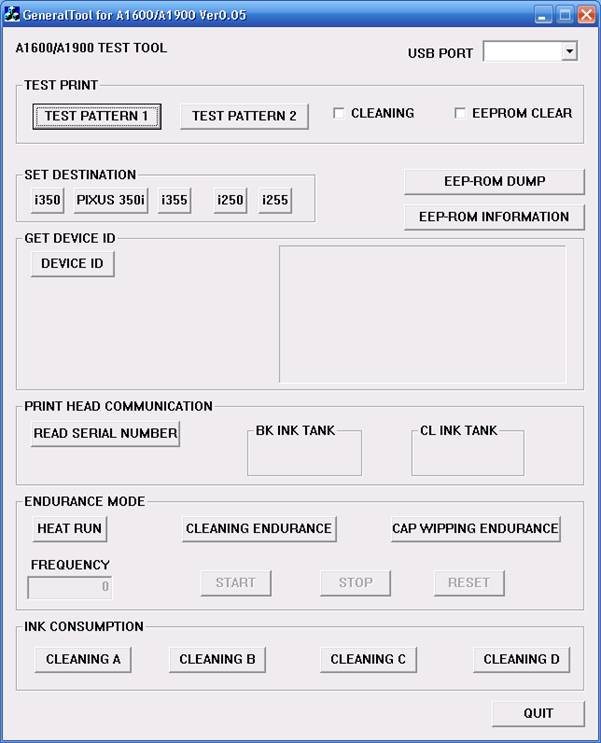
Reset Counter Canon i250, i255, i350, i355
To reset waste ink counter pad in Canon i250, i255, i350, i355 there are two Steps, that is reset manual and reset use software resetter (general tool). Whereas reset manual any two methode can be used. Here Complete tutorial to reset waste ink counter for Canon i250, i255, i350, i355 printers.
Manual Reset for Canon i250, i255, i350, i355
Methode 1 : Manual for service mode
- Unplug power cable from electric source and USB cable from computer.
- Open the printer cover and hold power button.
- Connect power cable to the electric source.
- Close the printer cover then release power button.
Methode 2: Manual for service mode
- Turn off the printer. And disconnect the printer cable.
- Press and hold the POWER button, turn on the printer.
- The indicator LED should be green.
- Press and release the RESUME button , the indicator LED should be orange.
- Press and release the RESUME button again, the indicator LED should be green.
- Release both buttons.
Resettting using software resetter canon i250, i255, i350, i355
- Reconnect the printer cable.
- Download and Run General Tools/software resetter for Canon printers i250, i255, i350, i355.
- Then select USB PORT where your printer installed.
- Choose printer type in SET DESTINATION sections and printer should be reset.
Note : After service mode use software for permanent reset Canon i250, i255, i350, i355

Compaq presario C770TU XP Driver
Compaq presario C770TU laptop comes with 1.73 GHz Intel Pentium dual core processor T2370, 1 MB L2 Cache, 1 GB DDR2 RAM, Intel Graphics Media Accelerator X3100,160 GB (5400 rpm) HDD, 15.4” WXGA High Definition BrightView Widescreen and so on. It comes with Free DOS. But if you have downgraded your OS, you would probably have trouble finding the drivers needed for your laptop. This is beacuse HP-Compaq does not support Windows XP anymore. But we have solved the issue for you. For all drivers for Compaq presario C770TU for windows XP, follow the post below.
Kindly check the link to know more about Issues regarding downgrading to or installing Windows XP in HP-Compaq systems
Neither Zyxware Technologies, nor HP-Compaq can give you a guarantee that these drivers will work perfectly in your system. How ever, you may try installing these.
You can either click or copy the given link and paste them onto a new driver to download them.
Video Driver:
ftp://ftp.hp.com/pub/softpaq/
Chipset and LAN Driver:
ftp://ftp.hp.com/pub/softpaq/
Wireless Driver:
http://h30322.www3.hp.com/pub/
HP Quick Launch Buttons:
ftp://ftp.hp.com/pub/softpaq/
Realtek RTL8100CL/RTL8110Sb NIC Driver
ftp://ftp.hp.com/pub/softpaq/
Intel Pro Wireless:
ftp://ftp.hp.com/pub/softpaq/
BroadCom Wireless:
ftp://ftp.hp.com/pub/softpaq/
Synaptics Touchpad drivers:
ftp://ftp.hp.com/pub/softpaq/
HP Help and Support for Microsoft Windows XP :
ftp://ftp.hp.com/pub/softpaq/
This model of Presario has an audio controller that supports the high definition audio. You need to have Microsoft Universal Audio Architecture (UAA) Bus Driver for High Definition Audio installed on the computer before installing the audio driver.
Here is the link for the Microsoft Universal Audio Architecture driver:
ftp://ftp.hp.com/pub/softpaq/
Conexant CX20549-12 High Definition Audio driver:
ftp://ftp.hp.com/pub/softpaq/
Note: Please copy the entire link starting from "ftp" to "exe" and paste it in the address bar of the browser in your computer and press enter.
1. Click on Start and select Run. Now type devmgmt.msc and press enter.
2. Right click on "Audio device on High Definition Audio Bus" and click Update driver.
3. Select "Install from a list or specific location"
4. Click Next. Then select "Don't search, I will choose the driver to install"
5. Click Next and then select "Sound, video and game controller" from the list.
6. Click Next and then click Have Disk.
7. Click Browse C:\swsetup\sp36090 folder and the double click the V32 folder. Select the .inf file, click open and Continue with the onscreen instructions.
Similarly install Modem Drivers:
Conexant CX20548 Modem Driver for Microsoft Windows XP
ftp://ftp.hp.com/pub/softpaq/
1.Right click on "Modem device on High Definition Audio Bus" and click Update driver.
2. Select "Install from a list or specific location"
3. Click Next. Then select "Don't search, I will choose the driver to install"
4. Click Next and then select "Modem" from the list.
5. Click Next and then click Have Disk.
6. Click Browse C:\swsetup\sp33890 folder and select the .inf (wis30b2b) file and click open and Continue with the onscreen instructions.
Fixing Compaq Presario Laptop Not Recognizing Microphone And Headphones In Windows XP
My friends Compaq Presario C770TU laptop started having issues with external headphones and microphone being not recognized by Windows XP, contacting HP support regarding the problem resulted in the response below with links to download Windows XP drivers :
"I would like to share that the above mentioned notebook has not been certified on XP and hence not supported. Hence we would not encourage the use of NON-Certified drivers on the product as it may lead to degraded performance and damage the product in some instances which would then not be covered under standard warranty.
However if you would like to pursue Win XP installation on the product, I have captured the links below wherein the nearest compatible drivers are available."
First of all its very bad on HP's part to not support one of the world's most successful and widely used operating system, secondly the audio driver they sent links to download does not solved the problem, I had to try different Conexant audio drivers to finally find a working one , if you are having similar issues with your HP laptops follow the instructions ahead to get your headsets working on Windows XP.
Problem : Unable to use internal or external microphone, laptop speakers won't mute while external headphones are plugged in, installing HP's sound driver (sp34386) produces error message: "Driver Installation Failed: Could not find the MEDIA device for this driver" on HP Compaq Presario Laptop running Windows XP.
Solution : Download and install correct drivers as follows.
- Download and install Microsoft UAA Audio Driver, reboot your laptop after install.
- Download and save Conexant SmartAudio 221 audio driver.
- Unzip the downloaded driver and run setup, if error occurs use device manager as instructed next.
- Right-click My Computer and select Manage.
- Click Device Manager from Computer Management screen and navigate to "Sound, video and game controllers", right-click Conexant High Definition Audio or Audio Device on HD entry and select driver update.
- Continue with the wizard selecting "No To Connect - > Install from a list or specific location -> Don't Search, I will choose the driver to install".
- Click Have Disk button.
- Browse for the folder downloaded and extracted in Step 2 above and select the driver file WiSVHe5.inf.
- Ignore any warnings and continue installation, your problem should be fixed now.


Sumber : http://www.megaleecher.net/Fixing_Laptop_Microphone_Issues
Complete XP Driver for Compaq Presario V3828AU Notebooks
If you want to install XP in your Compaq Presario V3828AU Notebooks, You may should download all of this Compaq Drivers for XP.
a. for Video Graphics Chipset Driver you need NVIDIA nForce 630M Chipset => download here
b. for Video XP you need NVIDIA GeForce 7150M , can be download it from here
c. for Quick Launch download HP Quick Launch Button that will downloaded from here
d. Ricoh Card Reader Host Control for V3828AU can be found here
e. Wireless LAN driver by Broadcom can be downloaded here.
f. for Ethernet LAN Network Drivers download it from here Realtek RTL8139/810x Family Fast Ethernet, Download it here or download it from here.
After rebooting your laptops,installing another driver
a. Microsoft Universal Audio (MS UAA) Bus Driver for High Defnition Audio download it here.
b. for Sound Audio Driver download from Conexant High Definition Audio Driver here.
c. Data Fax modem requires Conexant HDAUDIO SmartCP drivers. get it here.
d. for Compaq Presario V3828AU Webcam you need Cyberlink YouCam driver.
e. HP Integrated Model for Bluetooth Wireless
gey it free here.
Here short description about Compaq Presario V3828AU notebooks, Powered by AMD Turion 64 X2 Dual Core processor, 1GB of RAM, 160GB of hard drive and it also completed by NVIDIA(R) GeForce Go 7150M graphics.


