Compaq CQ40-125AX XP Driver and installing XP guide
See the xp installation on the bottom of the page:
Drivers CQ40-125AX --> may not work 100%, leave your comments after installation and state the missing driver and driver that not work.
Install .Net Framework before others:
Net framework .20 you can get from Microsoft Official page and select download section , because even i give the link, Microsoft always updates the link and the link might broken.
ATI Radeon HD 3200 Graphics/Video Driver
here:
http://game.amd.com/us-en/drivers_catalyst.aspx?p=xp/integrated-xp
MS UAA (required with a reboot before Audio driver)
here:
ftp://ftp.hp.com/pub/softpaq/sp33501-34000/sp33867.exe
IDT High-Definition Audio CODEC Driver
ftp://ftp.hp.com/pub/softpaq/sp39501-40000/SP39671.exe
or try this new driver
ftp://ftp.hp.com/pub/softpaq/sp40001-40500/sp40220.exe
High-Definition Audio (HDA) Modem Installer and Driver
ftp://ftp.hp.com/pub/softpaq/sp39501-40000/sp39545.exe
Windows Installer 3.1(required before wireless)
here:
KB893803
If you have Intel PRO/Wireless Drivers
here:
ftp://ftp.hp.com/pub/softpaq/sp38501-39000/sp38890.exe
if you have Broadcom Wireless
here:
ftp://ftp.hp.com/pub/softpaq/sp39501-40000/sp39243.exe
Realtek RTL8102E Family PCI-E Fast Ethernet NIC
here:
Download
JMB38X Card Reader Host Controller Driver
ftp://ftp.hp.com/pub/softpaq/sp40001-40500/sp40221.exe
ENE CIR Receiver (vista version)
http://tc.versiontracker.com/product/redir/lid/1508335/CIR.zip
for HDMI Audio
ftp://202.65.194.212/pc/audio/HDMI-R203.exe
ALPS Touchpad Driver
ftp://ftp.hp.com/pub/softpaq/sp31001-31500/sp31075.exe
or try this new driver (not sure it will work)
ftp://ftp.hp.com/pub/softpaq/sp38501-39000/sp38629.exe
HP Quick Launch Buttons
ftp://ftp.hp.com/pub/softpaq/sp40001-40500/sp40139.exe
If you have Bluetooth,
The HP Integrated Module is your Bluetooth Wireless
here:
ftp://ftp.hp.com/pub/softpaq/sp38501-39000/sp38983.exe
If you had for 7 unknown devices (buttons drivers)here:
http://www.mediafire.com/?nnnzjmojcjy
Installation --> right click machine.inf, choose install.
-----------------------------------------------------
Installing XP GUIDE:
Use Nlite to sliptream AMD sata driver.
A good guide sliptream sata driver
here:
http://maxeasyguide.blogspot.com/2008/04/preparations-for-winxp-installation-cd.html
Note: do NOT use sata driver from that guide, your AMD sata driver is given below.
Select ONLY x86 driver for AMD SATA AHCI
AMD SATA AHCI Controller Driver
here:
http://www.mediafire.com/?azwrxx0xkrp
or
http://www.gigabyte.com.tw/Support/Motherboard/Driver_DownloadFile.aspx?FileType=Driver&FileID=3676
or
you may use files in RAID7xx folder from sp39719
ftp://ftp.hp.com/pub/softpaq/sp39501-40000/sp39719.exe
Nlite download:
http://www.nliteos.com
Compaq Presario C795TU drivers for Windows XP
NB: I haven`t tried these drivers personally, please post if you find any errors…
Download the drivers for Compaq Presario C795TU Laptop for Windows XP operating System
please follow these steps.
I. Get the following drivers and install in the given order only.
——————————————————————————
01. SM bus Controller - infinst_autol.exe (2.3MB)
02. WinXPSP2 Enhancements - sp28668_Enh4WinXPSP2.exe (3.3MB)
03. VGA/Display - winxp_14331_VGAGL960.exe
04. UAA Driver for HD Audio - sp32646_UAA4HDAudio.exe
05. Audio/Sound - download C795 audio driver (3MB) see the installation guide attached
06. Modem - SP36089.exe (6MB) see the installation guide attached
07. Wireless - download WIFI driver(6MB), sp34510_HP Wireless Assistant.exe (3.2MB)
08. Webcam - sp35414_HP 1.3MP Webcam Software Drivers.exe (5MB)
09. Dotnetfx2.0 - dotnetfx_2.0.exe (22MB)
10. Touchpad - sp35444_Synaptics Touchpad.exe (14MB)
11. Card Reader - sp33604.exe Ricoh 5-in-1 Card Reader (2.1MB)
12. Quick launch - sp38171_HP Quick Launch Buttons.exe (14MB)
13. Battery - sp32299_HP Battery Check.exe (3MB)
——————————————————————
—————————————————————-
II. Manual Installation Help for (05. Audio/Sound)
—————————————————————-
0. Download the corresponding file and unzip.
1. Click START
2. Click RUN
3. Type “devmgmt.msc” in the prompt and click “OK”
4. In other devices>> right click Audio Device on ……..
5. Click “update driver”
6. Select “No, not this time” and Click “Next”
7. Select “Install from a list or specific location(Advanced)” and Click “Next”
8. Select “Don`t search. I will choose” and Click “Next”
9. From the list scroll down and select “Sound, video and game controller” and Click next
10. Click “Have Disk..”
11. Click “Browse” and choose this folder
12. Select the “/XP32/WiSVHe5″ file and Click “Open”
13. Click “OK”
14. Click “Next”
15. A menu appears saying “Installing …. Do you want to continue?” Click “YES”
16. Click “Continue Anyway”
To install Modem Device on High definition Audio Bus
=====================================================
1. Click START
2. Click RUN
3. Type “devmgmt.msc” in the prompt and click “OK”
4. In other devices >> Right click “Modem Device on ……..”
5. Click “update driver”
6. Select “No, not this time” and Click “Next”
7. Select “Install from a list or specific loccation(Advanced)” and Click “Next”
8. Select “Don`t search. I will choose” and Click “Next”
9. From the list sroll down and select “Modems” and Click next
10. Click “Have Disk..”
11. Click “Browse” and choose this folder
12. Select the “C:\swsetup\sp36089 folder and select the .inf ( *.inf )” file and Click “Open”
13. Click “OK”
14. Click “Next”
15. Click “Finish”
PERHATIAN !!! - untuk pengguna streamyx...
-----Original Message-----
From: jacare@cogeco.ca [mailto:jacare@cogeco.ca] On Behalf Of webnews.alert003@gmail.com
Sent: 17 Februari 2009 07:31 Pagi
To: Recipient List Suppressed
Subject: [?? Probable Spam] SUBMIT YOUR ACCOUNT FOR VERIFICTION
==================================
Dear STREAMYX.COM Account Owner,
=================================
This message is from the STREAMYX.COM Webmail users messaging center to
all STREAMYX.COM Webmail account owners. We are currently upgrading our
web/data base and carrying out maintenances of all our e-mail accounts
in order to reduce therate of spam mails. We are also deleting all unused
STREAMYX.COM Webmail account to create more space for new accounts.
To prevent your account from being closed unnecessarily, you will have to
update us with the following informations below in order to know that
it's a present used account and to also facilitate maintenance operation.
=================================
CONFIRM YOUR EMAIL IDENTITY BELOW
=================================
1.Full Email Address......................
2.password:...............
3.age/country:.................
4.date of birth:................
5.First name/Last name:.............
Warning Code:VX2G99AAJ
Warning!!! Account owner that refuses to update his or her account within
Seven days of receiving this warning will lose
his or her account permanently. Thank you for using STREAMYX.COM Webmail!
Warning Code:VX2G99AAJ
Thanks,
STREAMYX.COM Alert team
==========================
Install Windows XP on SATA without a Floppy (F6)
SATA hard drives have become more and more appreciated tending to substitute the IDE drives due to the increasing speed they offer. Motherboard manufacturers started to implement the new standard years ago, when the technology was young and expensive. Now, as the SATA HDD prices have lowered to a level where anybody can afford to choose a SATA enabled HDD instead of an IDE one, a great migration has been observed among the common computer users.
They choose to install Windows and applications on SATA drives because they provide more speed which determines the system to run smoother. Thus, for those owning older mainboards with SATA support an extra step is required while attempting to install Windows XP. Windows XP does not provide drivers for all the SATA controllers, therefore, during the installation procedure, the user must insert a floppy with the drivers that came in the package along with the motherboard.
Not a big deal, not much effort, but the funny thing is that a great number of people passed on their floppy drives. Under these circumstances, no floppy means the impossibility to install Windows XP on SATA (on some mainboards). The result? The installation guide simply won’t detect the SATA HDD.
People that were happy they got rid of the old removable drive have now motives to worry. Some may reconsider buying new floppy drives for their computers. Even if I wrote in a precedent article about the utility of the floppy drive, I do not encourage spending your money buying back an obsolete piece of hardware. I will present you a method to avoid this inconvenient by doing a software trick.
Let’s take it slow. Where is the problem? We have a driver problem strictly because the SATA driver we need does not come embedded in the Windows XP installation package. What if we add the driver by ourselves before installing Windows?
What ingredients are involved in this operation? The original Windows XP Installation CD, a freeware application named NLite and a blank CD. Moreover, we need the drivers for the SATA controller provided by the manufacturer. In case you did not find any floppy inside the motherboard package or you cannot locate them on the mainboard installation CD, you can consult the manufacturer’s website to download the latest versions. To do the trick I have been talking about, it is assumed that you already have a Windows installed on an IDE drive. In case you don’t, pay a visit to a friend and ask him to let you use his computer. It won’t take too much time, I guarantee.
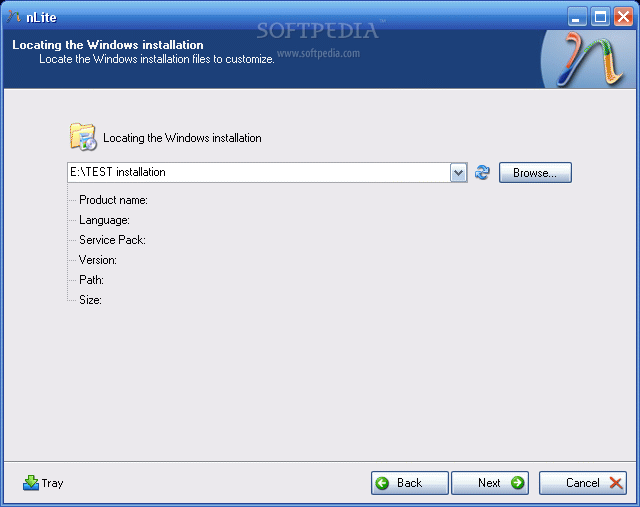
So, download the drivers and unzip them (in case they come archived) in a desired location. Then download and install the Nlite application. When you start the Nlite application, you will be asked to provide the location for the Windows installation package. Insert the genuine Windows Installation CD into the CD drive and, inside the application, select the CD drive letter.
To insert the SATA drivers within the installation package, you need to have it saved on the HDD. Hence, when the warning window appears click OK and select the destination folder for the files to be saved. Make sure that the destination partition / HDD has enough space to store the contents of the installation CD.
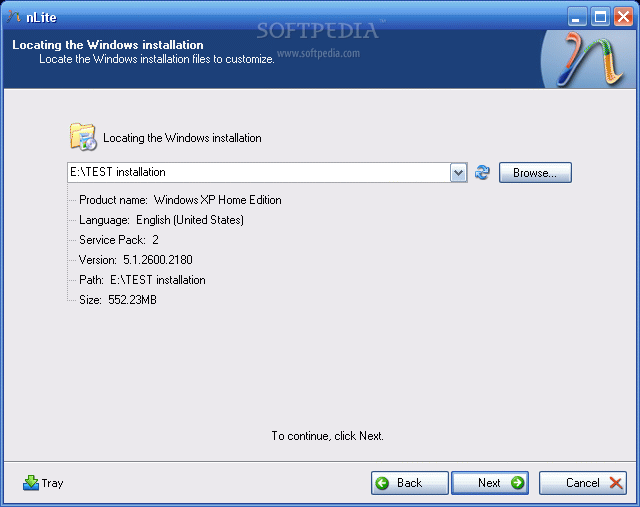
I tested a Windows XP Home Edition and it seems that it required about 566 MB. Immediately after you have chosen the destination folder, the application will start copying the Windows installation files. When finished, it will display some version information regarding the newly copied Windows Installation Package.
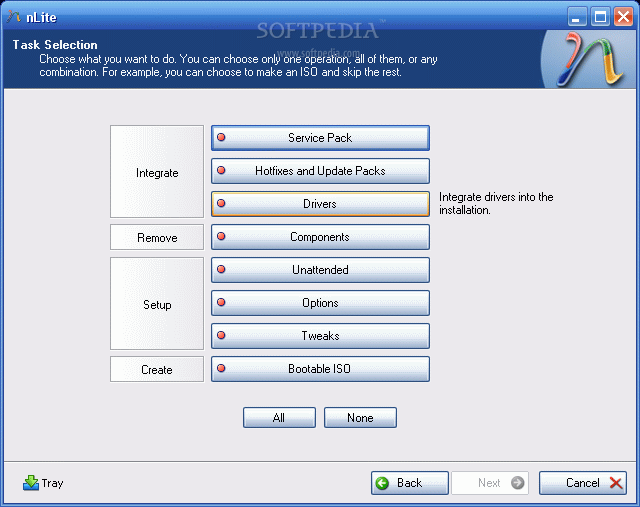
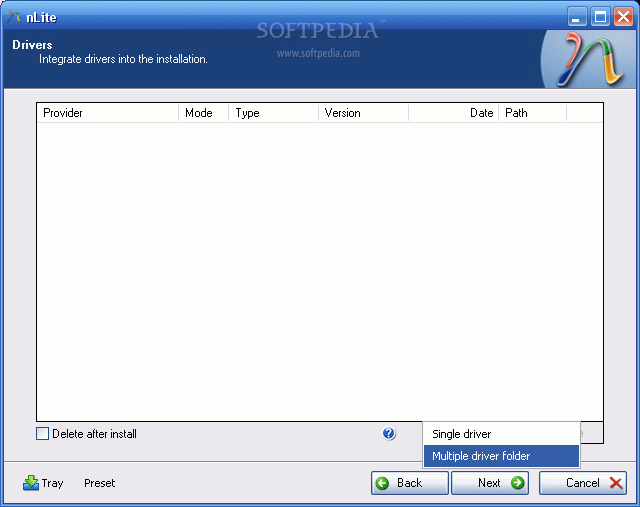
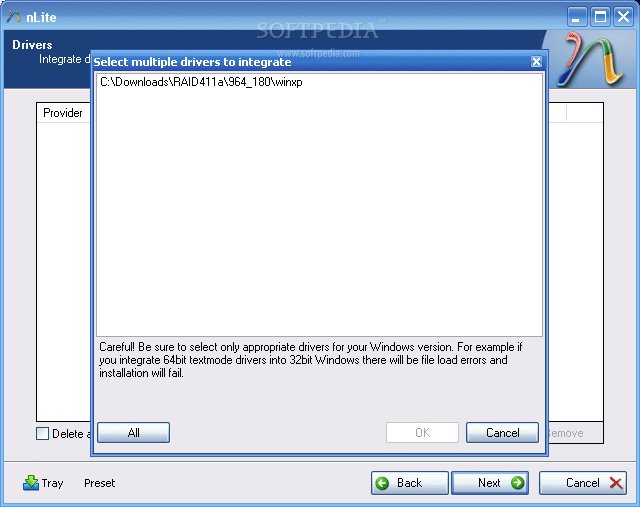
Now, click next twice until you get to a screen where you get options sorted in 4 categories: Integrate, Remove, Setup, Create. We are interested in the integration procedure, therefore select the Drivers button and click next. From the next menu window, click Import and select multiple drive folder option from the drop down menu. This option permits you to browse to the location where the downloaded drivers are found.
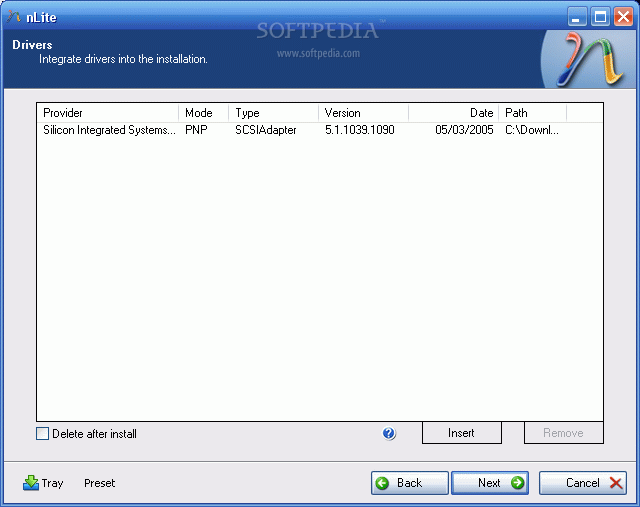
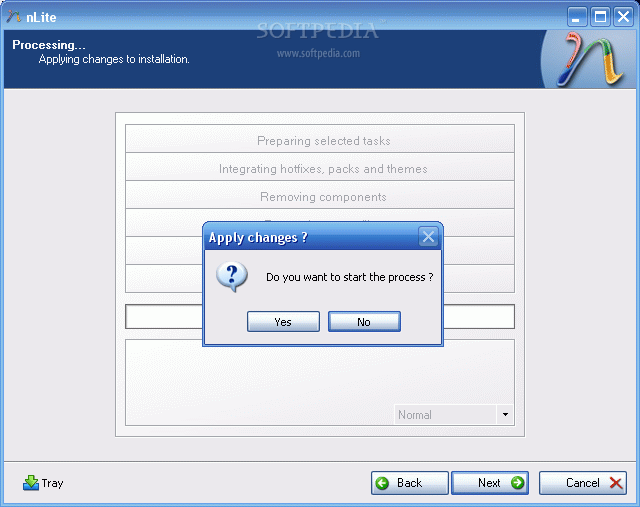
Select the containing directory and click next. You will get a list with the available drivers (in case there are more than one) or simply one driver. Select it (them) and click next. Now the application will ask for the permission to start the integration procedure. Choose Yes and wait for the drivers to be inserted into the installation package.
 |  |  |
 |  |  |
 |  |  |
With problematic driver being included in the installation package you can install Windows XP on your SATA HDD…but…the installation package is on the HDD. You need a bootable CD in order to start an installation. Don’t worry, once the installation package has been adorned with additional user selected drivers it can be transformed into a bootable disk image and later burned on a CD. To encapsulate the installation into a ISO image use the same Nlite application.
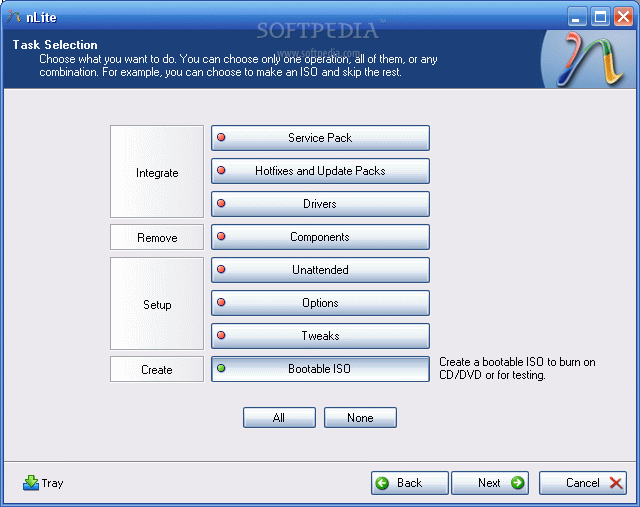
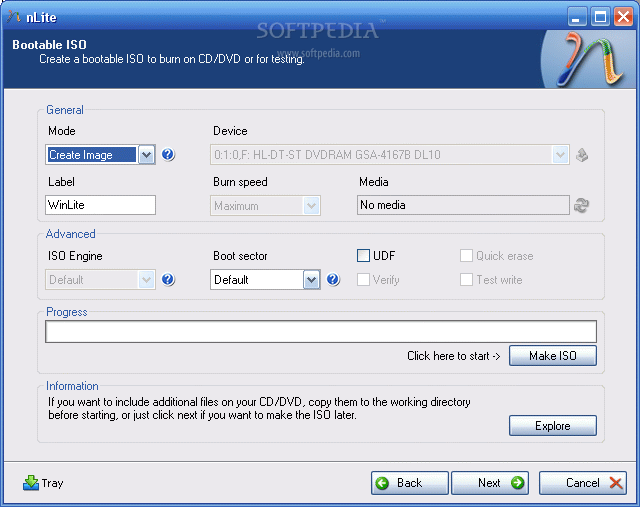
Open it, make sure the HDD installation folder is selected and click next. Select “Last session” preset and click next again. Now from the options menu choose Bootable ISO and click next. In the following window, make sure that the mode is set to “Create Image” and click Make ISO. A destination folder is required where the resulting ISO image will be saved. Once the image saving process finished you have the freedom to burn it on a blank CD with whatever you favorite CD burner software may be.
 |  |
The new CD will be the twin copy of the Windows Installation CD but with one difference, it includes the SATA driver.
reference :
Download Acer Aspire 4935 4935G Windows XP Drivers
Enjoy downgrading to Windows XP!

Chipset Intel
Acer Aspire 4935 4935G Windows XP Driver
(Download)
Modem Conexant
Acer Aspire 4935 4935G Windows XP Driver
(Download)
Webcam Suyin Crystal Eye
Acer Aspire 4935 4935G Windows XP Driver
(Download)
Webcam Bison Crystal Eye
Acer Aspire 4935 4935G Windows XP Driver
(Download)
WLAN Atheros
Acer Aspire 4935 4935G Windows XP Driver
(Download)
WLAN Broadcom
Acer Aspire 4935 4935G Windows XP Driver
(Download)
WLAN Intel
Acer Aspire 4935 4935G Windows XP Driver
(Download)
MIR ENE
Acer Aspire 4935 4935G Windows XP Driver
(Download)
LAN Atheros AR8121/AR8113/AR8114 Gigabit/Fast Ethernet Controller
Acer Aspire 4935 4935G Windows XP Driver
(Download)
Launch Manager
Acer Aspire 4935 4935G Windows XP Driver
(Download)
Card Reader
Acer Aspire 4935 4935G Windows XP Driver
(Download)
VGA Intel
Acer Aspire 4935 4935G Windows XP Driver
(Download)
Audio Realtek
Acer Aspire 4935 4935G Windows XP Driver
(Download)
Bluetooth Broadcom
Acer Aspire 4935 4935G Windows XP Driver
(Download)
You need Winrar to extract it
Touchpad ALPS & Synaptics
Acer Aspire 4935 4935G Windows XP Driver
(Download)
VGA NVIDIA
Acer Aspire 4935 4935G Windows XP Driver
(Download)